
1. Capabilities
One JSON configuration exposes multiple image models without creating a separate account for each.2. Requirements
- Windows 10 or later; Windows 7, 8, and 8.1 are unsupported.
- macOS 12 Monterey or later.
3. Prerequisites
- WorkBuddy installed.
- A key (
sk-xxxxxxxxxx) from the GravitexAI Console. - On Windows: install Node.js LTS with the default options so
npxis available.
4. Quick start
Step 1: Create an API key
Open the GravitexAI Console, create and name a token, and copy the key beginning withsk-.
Step 2: Open Custom connectors
In the left sidebar, open Experts · Skills · Connectors, switch to Connectors, and click Custom connector at the top right. The screenshot shows the Chinese UI.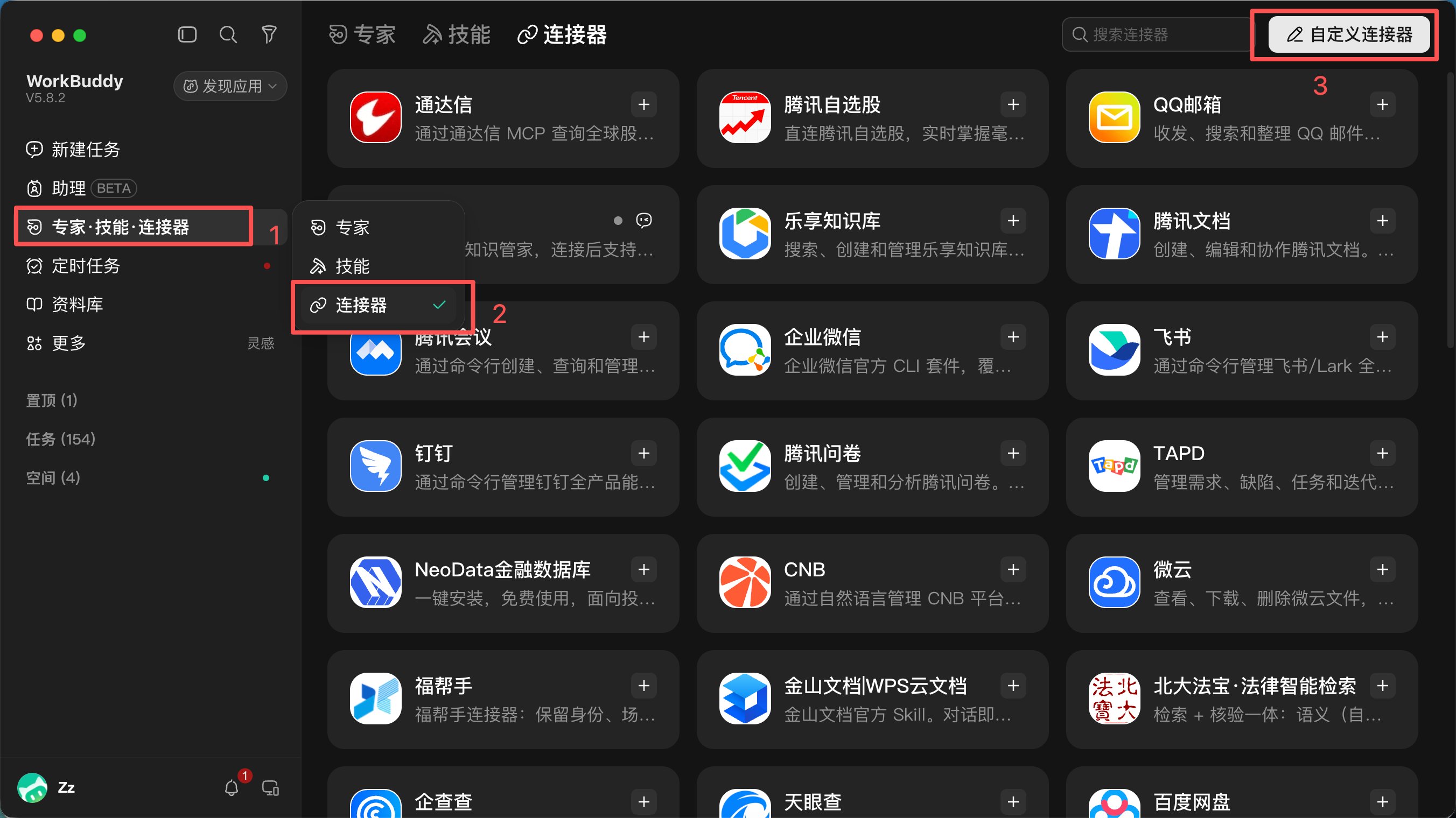
Step 3: Paste the JSON configuration
Paste the complete configuration below and replace everysk-your-api-key with your key.
Connector names such as gpt-flare are customizable and appear in WorkBuddy. On Windows, install Node.js LTS first and use
npx as command, not npx.cmd.Step 4: Restart and trust
Fully quit and reopen WorkBuddy:- macOS:
Cmd + Q; closing a window alone is insufficient. - Windows: exit from the taskbar/tray, or use
Ctrl + Shift + Escto confirm the process has stopped before reopening.
npx process, so trust others when needed.
Step 5: Start generating
In a task, open + → Connectors and select the image models you need. See the examples below.5. Model reference
Check exact IDs in the GravitexAI Model Catalog. To request a model not listed here, such as
seedream-5-0-260128, specify its full ID in chat to override the default for that call.6. Daily use
- Set a task default: choose a connector in + → Connectors.
- Switch by short name: say “Use flash” or “Try pro for another version.”
- Use another model temporarily: give its full ID, such as
seedream-5-0-260128, to override the default without changing the configuration.
IMAGE_MODEL value, then fully restart WorkBuddy; custom connectors do not support editing in place.
For text-to-image, describe the desired picture. For image-to-image, supply a reference and describe the changes.
7. Prompt examples
Text-to-image with the selected default
Draw a flat red apple icon at 1024x1024.
Choose a model by name
Use gemini-pro to draw a sunrise over snowy mountains.
Use flash to draw the same scene again.
Use gpt-flare to turn this picture into watercolor.
Edit an existing image
Use the lamb-grazing.png file on my desktop and change the background to red.
Change daytime to nighttime in this picture and keep everything else unchanged.
Size and quality
Draw a landscape at 1536x1024 using low quality for a quick result.
Generate a vertical phone wallpaper at 1024x1536 with high quality.Sizes:
1024x1024 (square), 1536x1024 (landscape), 1024x1536 (portrait). Quality: low (fast/economical), auto (default), or high (detailed; around 1–2 minutes).
Compare models
Have gpt-image-2 and gemini-pro each draw the same subject so I can compare them.
8. Troubleshooting
The configured connector is missing
The configured connector is missing
Replace all placeholder keys in the JSON and fully restart WorkBuddy. On macOS use Cmd+Q; on Windows confirm the process has ended in Task Manager before reopening.
The request returns 401
The request returns 401
Check that the key begins with sk- and has no extra spaces. Verify token status and balance in the GravitexAI Console; insufficient balance may also produce 401.
Image editing returns 404
Image editing returns 404
Some gateways use a different edits route and require an editPath setting. Check the model’s image-editing endpoint and the connector’s corresponding env configuration.
Windows cannot find npx
Windows cannot find npx
Install Node.js LTS and ensure it is on PATH, then restart WorkBuddy.
Does image generation consume WorkBuddy credits?
Does image generation consume WorkBuddy credits?
Image API costs are billed to GravitexAI rather than WorkBuddy credits or plan allowance. Monitor the GravitexAI balance and usage.
Can I edit the default model in place?
Can I edit the default model in place?
Remove the connector, re-add the JSON with the desired IMAGE_MODEL value, and fully restart WorkBuddy.