
1. Overview
OpenCode is an open-source AI coding assistant with first-class support for 75+ models and self-hosted deployments. Through GravitexAI, you can use mainstream models (GPT, Claude, Gemini, Qwen…) inside OpenCode without configuring every vendor separately.Unified multi-model
One provider, full GPT / Claude / Gemini / Qwen family
Self-host friendly
Supports your own backends and per-project config overrides
Responses API ready
apiCompatibility: "responses" works with the GPT Codex seriesOpen & auditable
Fully open-source, customize as needed
2. Quick Setup (GravitexAI)
2.1 Get an API key
1
Sign in
Go to the GravitexAI console and register or log in.
2
Create a token
Open API Keys, click “Create new token”, and copy the
sk-xxxxxxxxxx key.2.2 Configure a custom provider in OpenCode
1
Open provider settings
In OpenCode, go to Server / Provider settings and select Add custom provider (OpenAI-compatible).
2
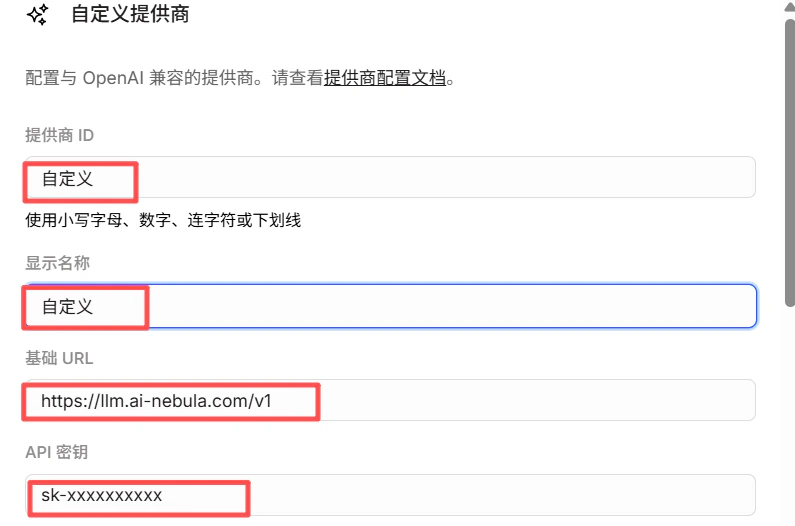
Fill in provider info
3
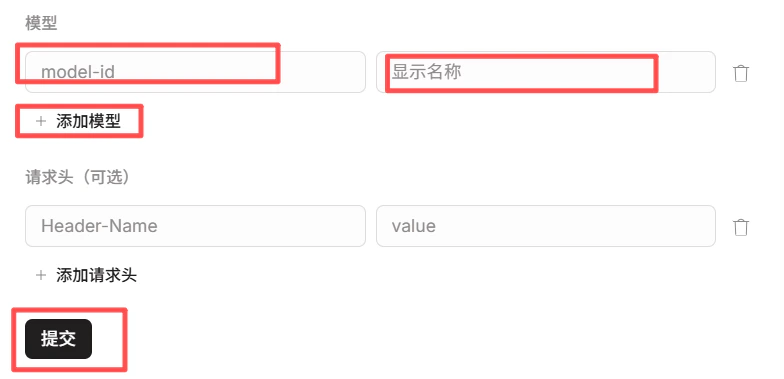
Add models
Under Models, add model IDs you want to use (e.g.
gpt-5.5, claude-sonnet-4-6, gemini-3.5-flash). IDs must match the GravitexAI model list.4
Save and use
After saving, select via
providerID/modelID in chats and settings, e.g. gravitex/gpt-5.5.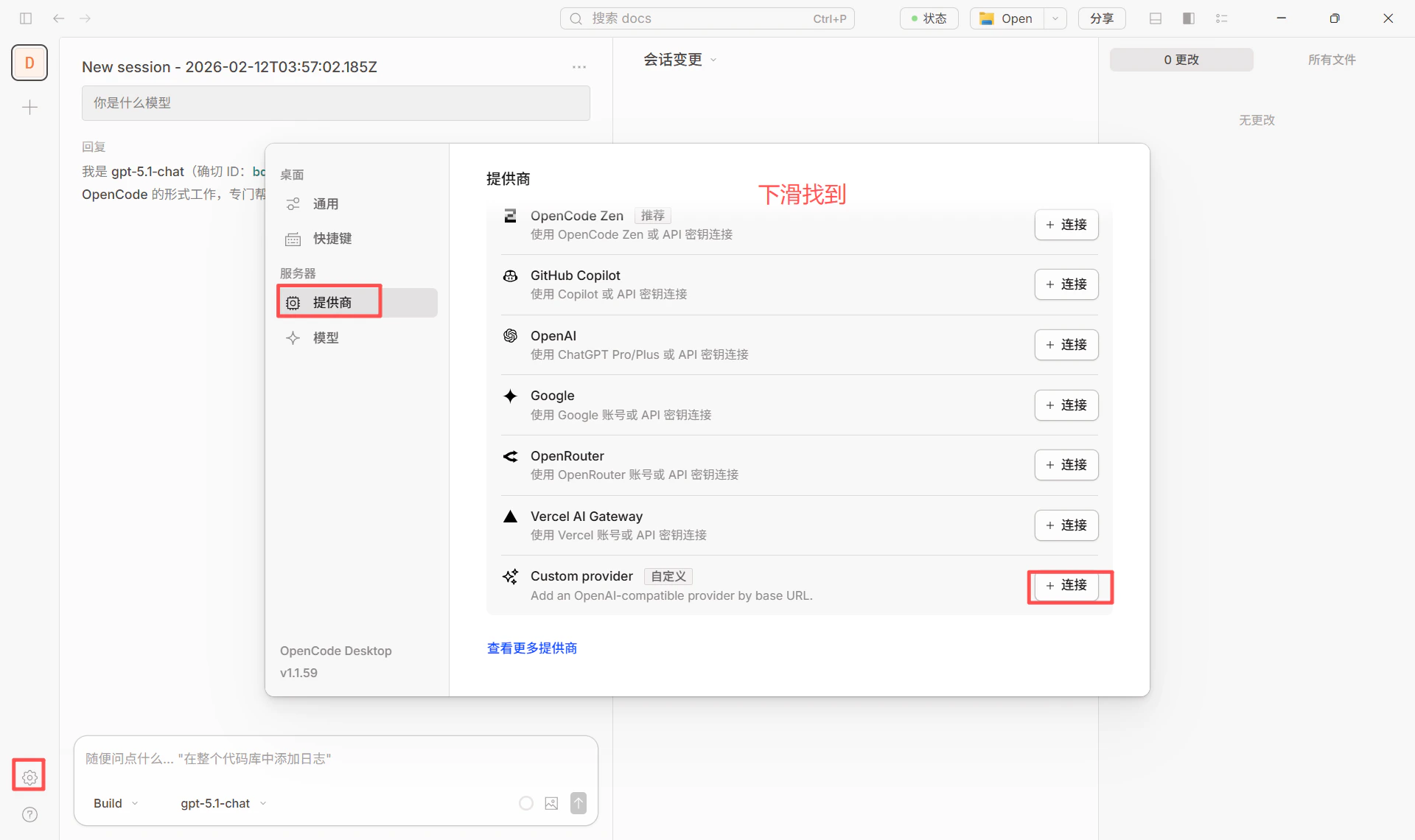
2.3 Switching models
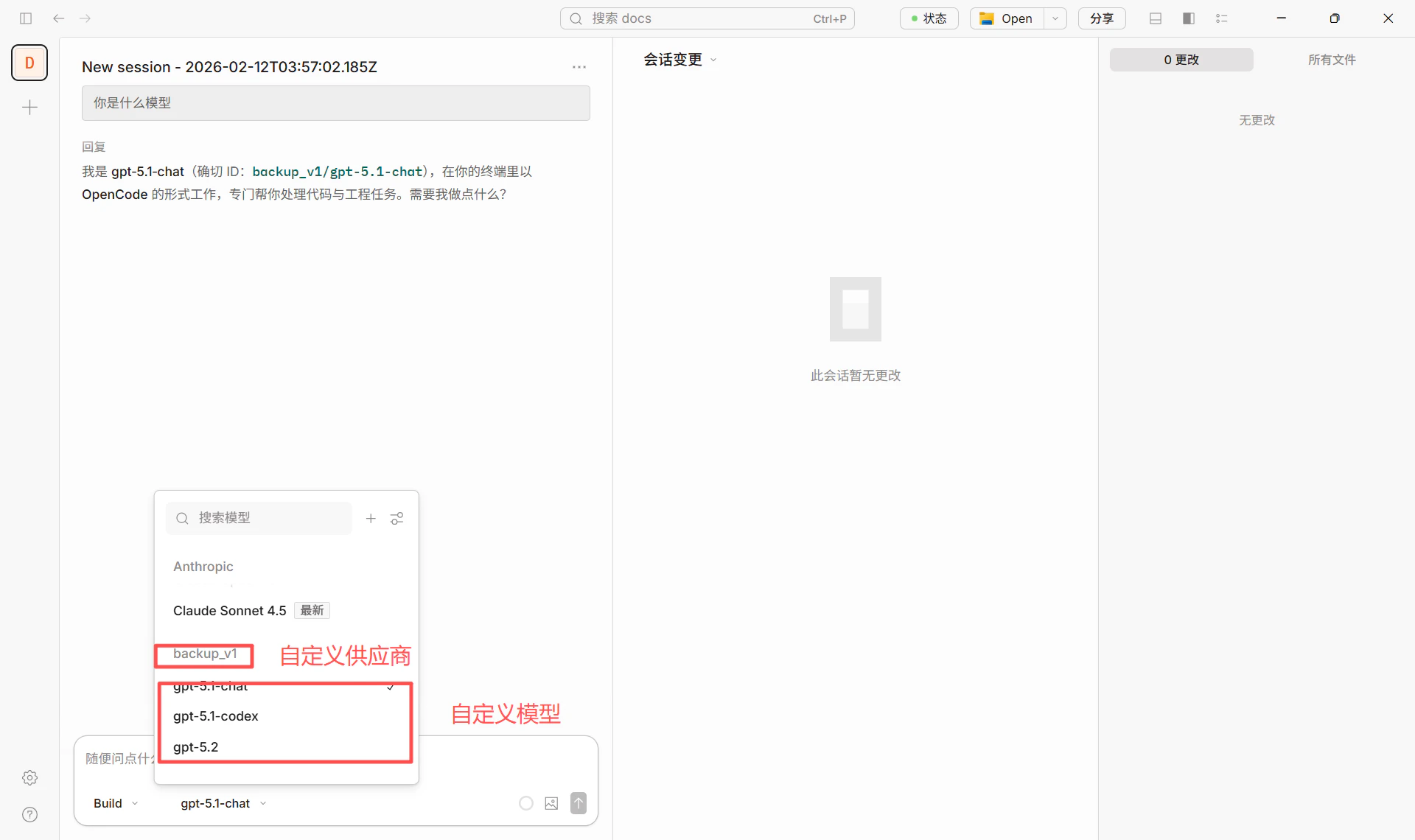
In chat or settings, pick the configured provider/model (e.g.gravitex/gpt-5.5) to switch.
3. Some Models Require the Responses API (Important)
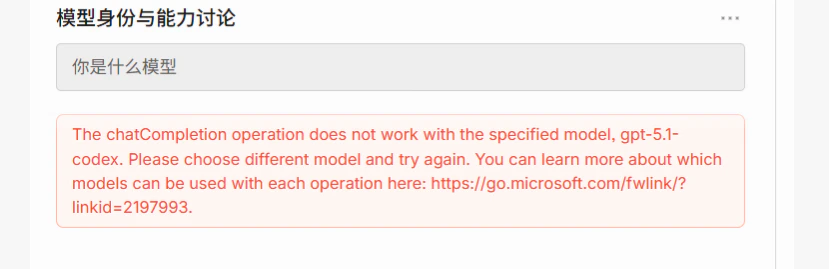
Some Azure / OpenAI models only support the Responses API, not the legacy Chat Completions endpoint. When OpenCode defaults to Chat Completions you’ll see:The chatCompletion operation does not work with the specified model, gpt-5.1-codex. Please choose different model and try again.The screenshot below shows how this error appears in OpenCode:
3.1 Models that require Responses API
For the latest full list, see Azure / vendor docs:
3.2 How to configure in OpenCode
Add theapiCompatibility parameter to a model in your config — no code changes needed.
1
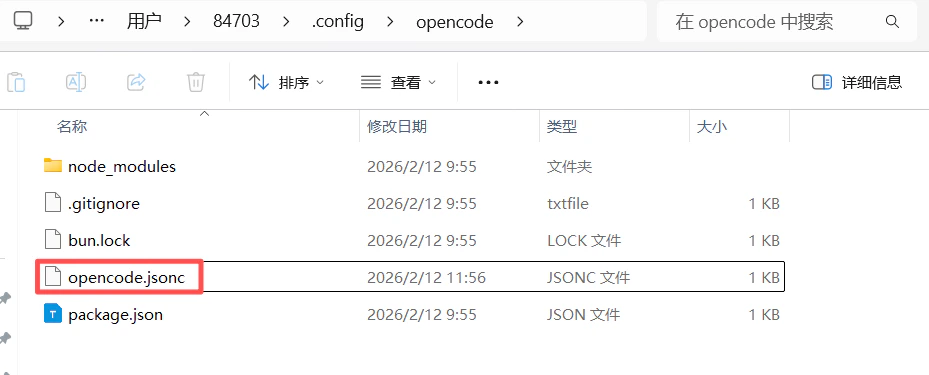
Locate the config file
- Windows:
C:\Users\<username>\.config\opencode\opencode.jsonc - macOS / Linux:
~/.config/opencode/opencode.jsonc
2
Add the parameter
In your existing custom provider (pointing at GravitexAI or your own API), add 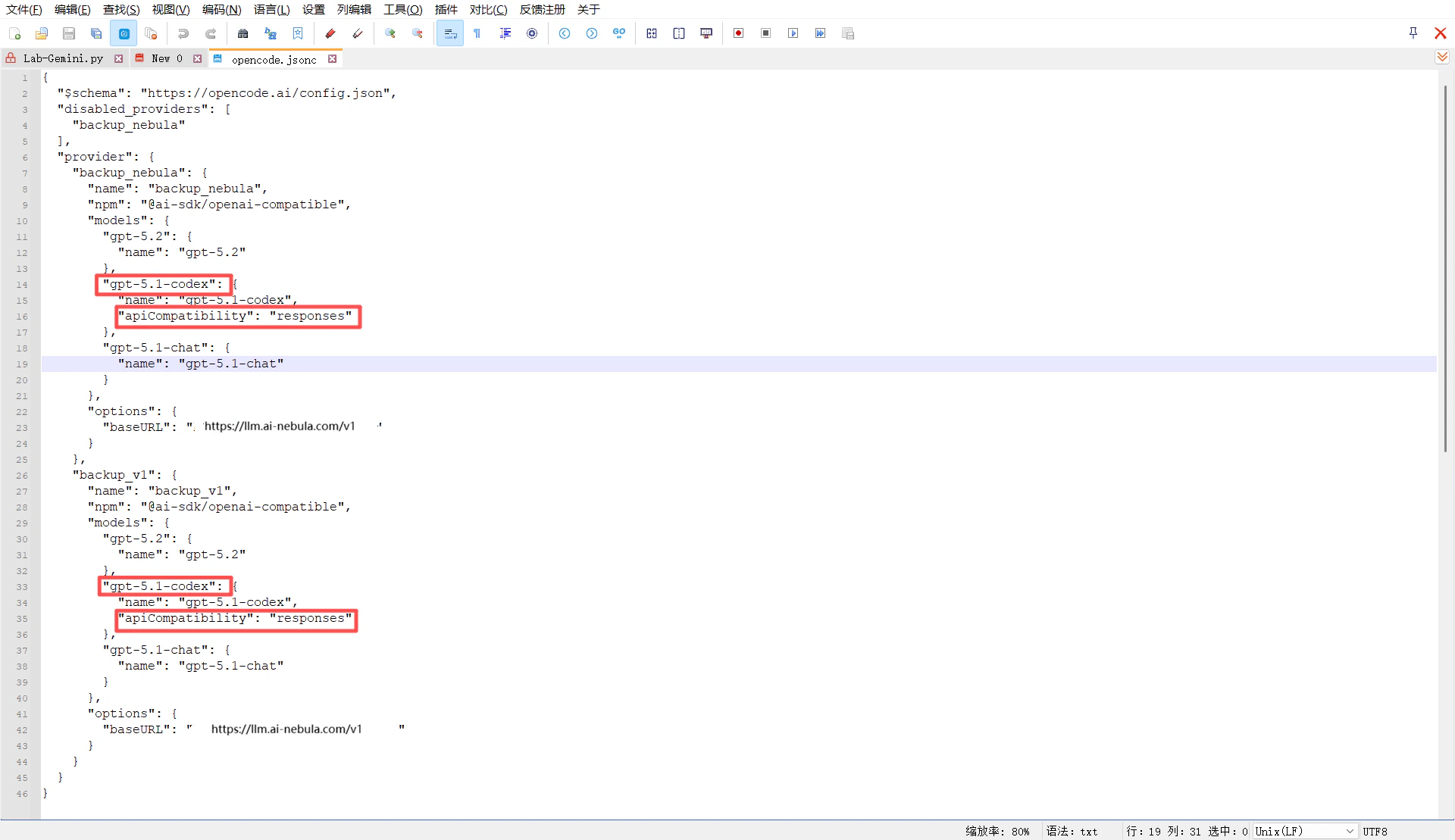
"apiCompatibility": "responses" for models that need it (e.g. gpt-5.1-codex):gpt-5.1-codex (e.g. backup_v1/gpt-5.1-codex) will send requests to that baseURL using the Responses API format.3
Verify the setup
Pick a correctly configured model (e.g. 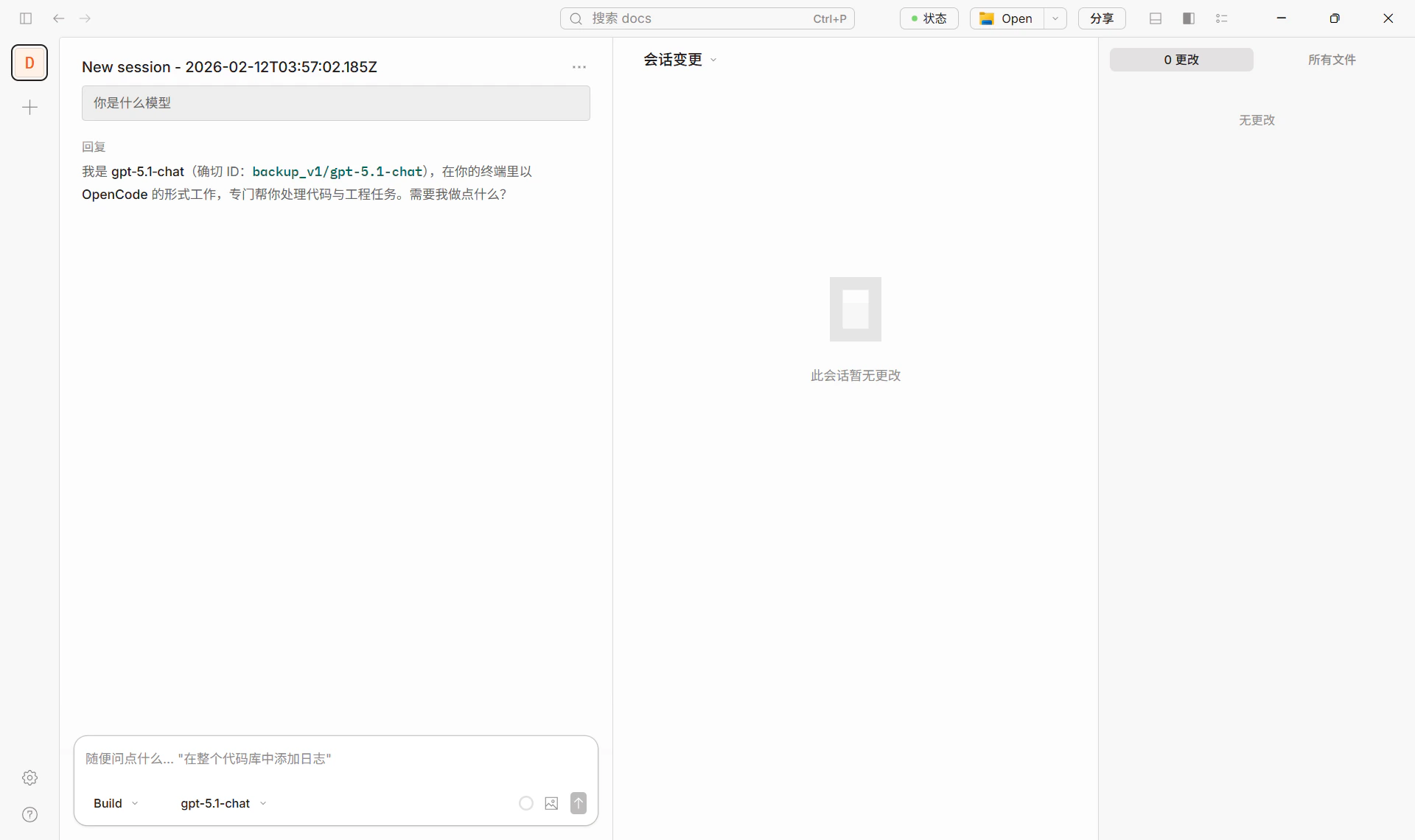
backup_v1/gpt-5.1-chat) and test a chat — successful reply means you’re good:3.3 Summary
4. Recommended Models (via GravitexAI)
See the GravitexAI model list for complete IDs.
Success example
A normal chat in OpenCode using GravitexAI:5. FAQ
The chatCompletion operation does not work… error
The chatCompletion operation does not work… error
That model only supports the Responses API. Add
"apiCompatibility": "responses" to it in opencode.jsonc — see Section 3.401 / invalid API key
401 / invalid API key
- Check the key for completeness and trailing whitespace.
- Confirm it isn’t deleted/disabled in the GravitexAI console.
- Ensure your balance is positive.
404 / endpoint not found
404 / endpoint not found
Make sure the Base URL ends with
/v1: https://api.gravitex.ai/v1.model not found for a valid-looking ID
model not found for a valid-looking ID
Model IDs must exactly match the GravitexAI list. Watch the case and version suffix (e.g.
claude-sonnet-4-5-20250929, not claude-sonnet-4-5).How to standardize across a team?
How to standardize across a team?
Commit
opencode.jsonc to .config/opencode/ in the repo (or the project root). Each engineer brings their own API key.6. References
- OpenCode site and download: https://opencode.ai/
- OpenCode config and models: Models, Providers
- GravitexAI console: https://maas.gravitex.ai
- Model catalog: https://maas.gravitex.ai/#/models