> ## Documentation Index
> Fetch the complete documentation index at: https://docs.gravitex.ai/llms.txt
> Use this file to discover all available pages before exploring further.
# Dify
> GravitexAI와 연동하는 시각적 LLM 애플리케이션 플랫폼 가이드
[Dify](https://dify.ai)는 시각적 오케스트레이션, 지식 베이스, 워크플로, API 서비스를 제공하는 오픈소스 LLM 애플리케이션 개발 플랫폼입니다 — 챗봇, agent, RAG 앱을 빠르게 출시할 수 있습니다.
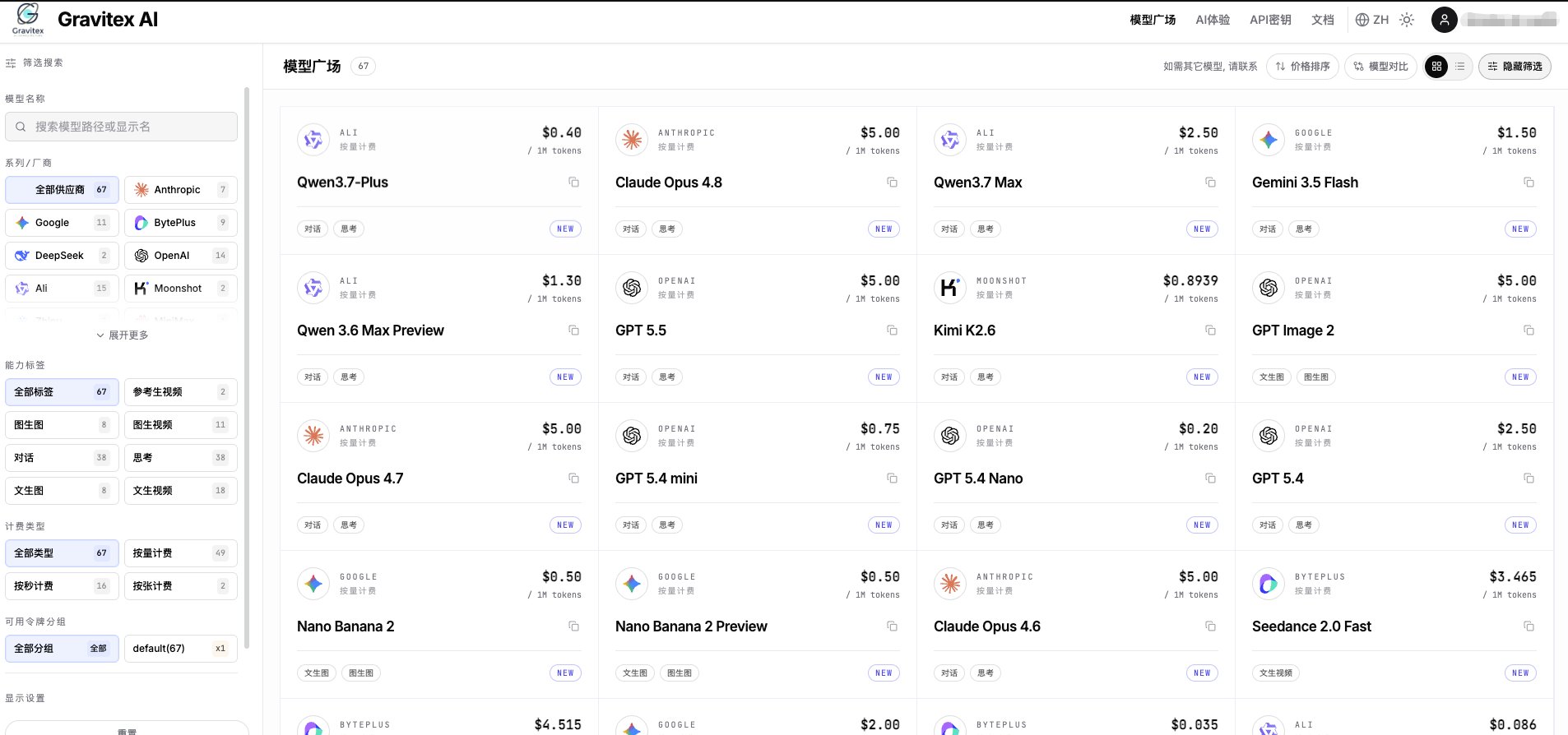
GravitexAI를 사용하면 단일 API key로 **100개 이상의 선도 모델**(Claude, OpenAI, Gemini, Qwen, DeepSeek, Kimi 등)을 구동하고, 통합 과금, 자동 장애 조치, 엔터프라이즈급 안정성의 이점을 누릴 수 있습니다.
 ## 1. 빠른 연동
### 1.1 API Key 발급
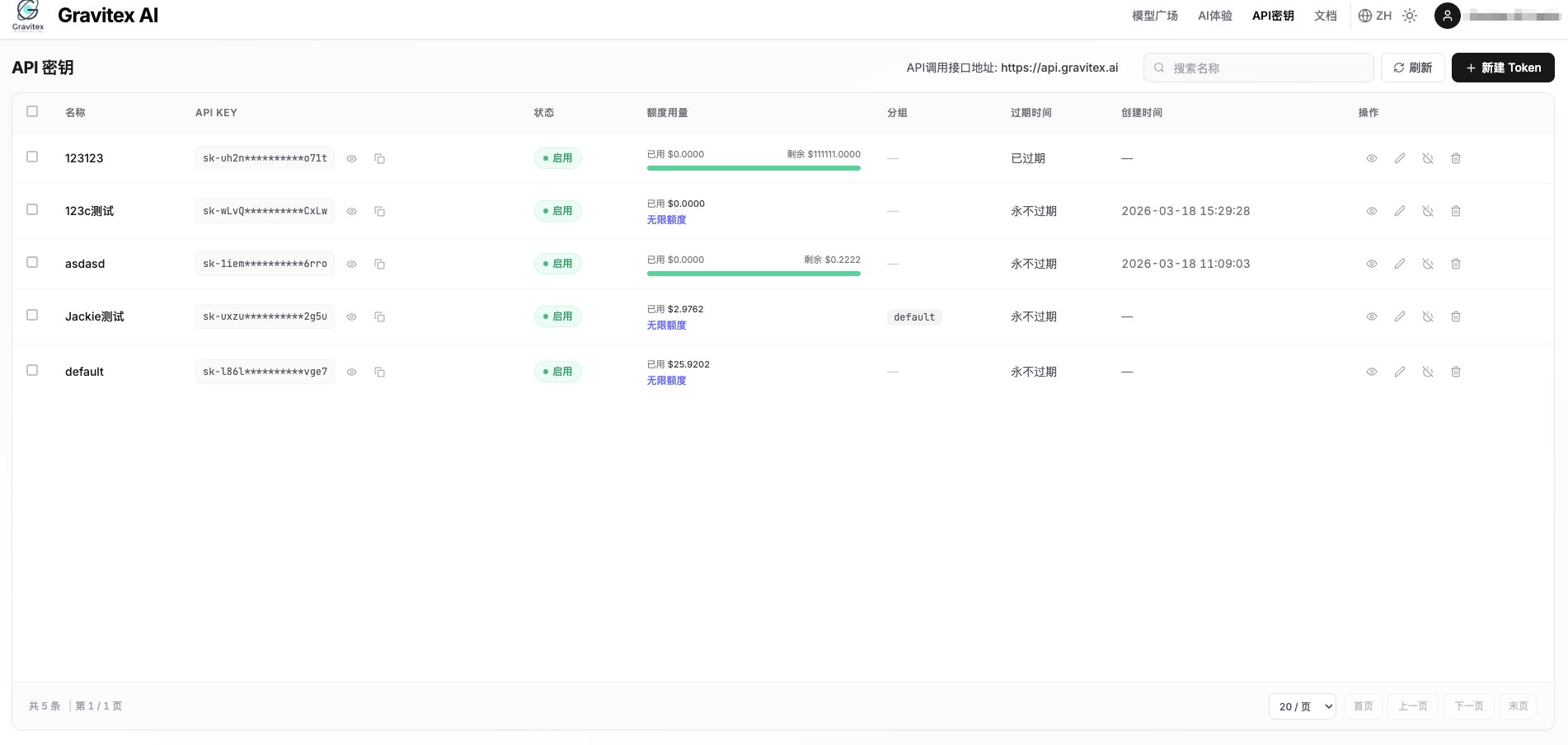
[GravitexAI Console](https://maas.gravitex.ai)을 방문하여 API key를 생성합니다:
## 1. 빠른 연동
### 1.1 API Key 발급
[GravitexAI Console](https://maas.gravitex.ai)을 방문하여 API key를 생성합니다:
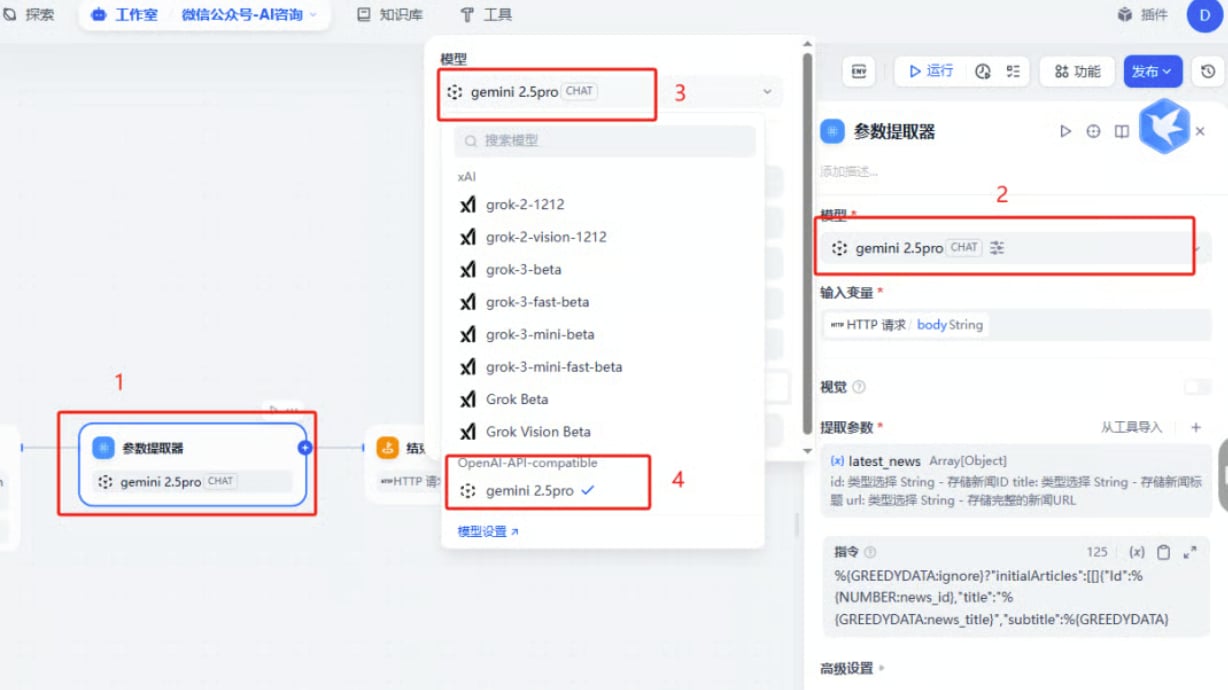
 ### 1.2 Dify Model Providers 열기
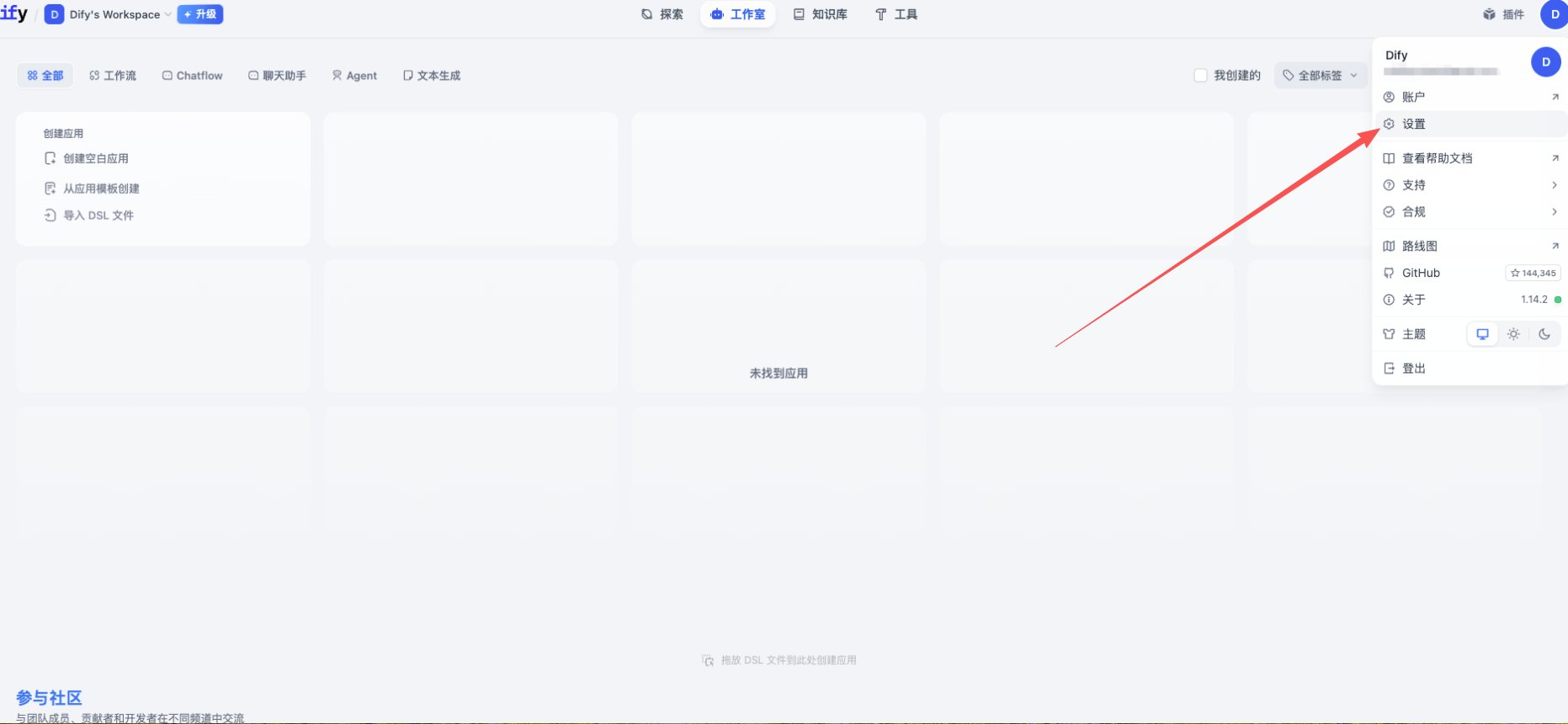
1. Dify에 로그인하고 아바타(우측 상단) 클릭 → **Settings**
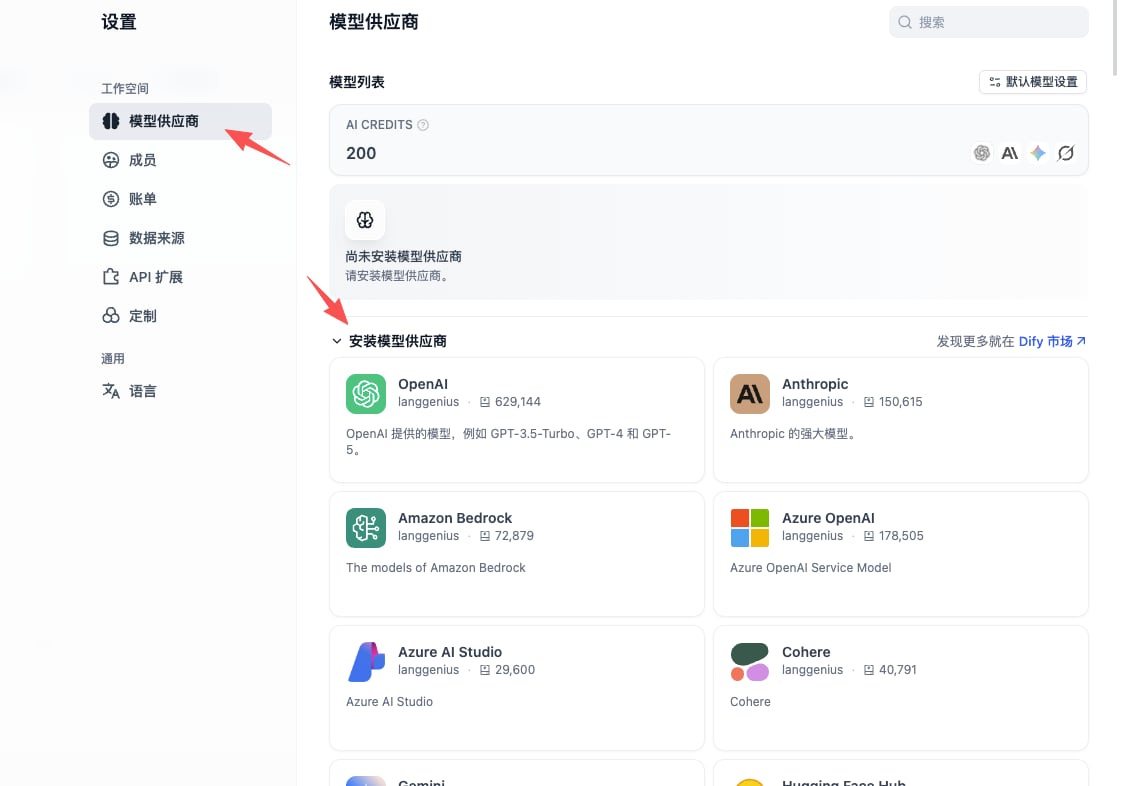
2. 왼쪽 메뉴에서 **Model Provider** 선택
3. 목록에서 **OpenAI-API-compatible** 플러그인을 찾아 설치
### 1.2 Dify Model Providers 열기
1. Dify에 로그인하고 아바타(우측 상단) 클릭 → **Settings**
2. 왼쪽 메뉴에서 **Model Provider** 선택
3. 목록에서 **OpenAI-API-compatible** 플러그인을 찾아 설치
 **OpenAI-API-compatible**은 LLM / Embedding / TTS / STT 엔드포인트 유형을 지원합니다. GravitexAI는 완전 호환 — 하나의 플러그인으로 모든 모델을 커버합니다.
### 1.3 모델 추가
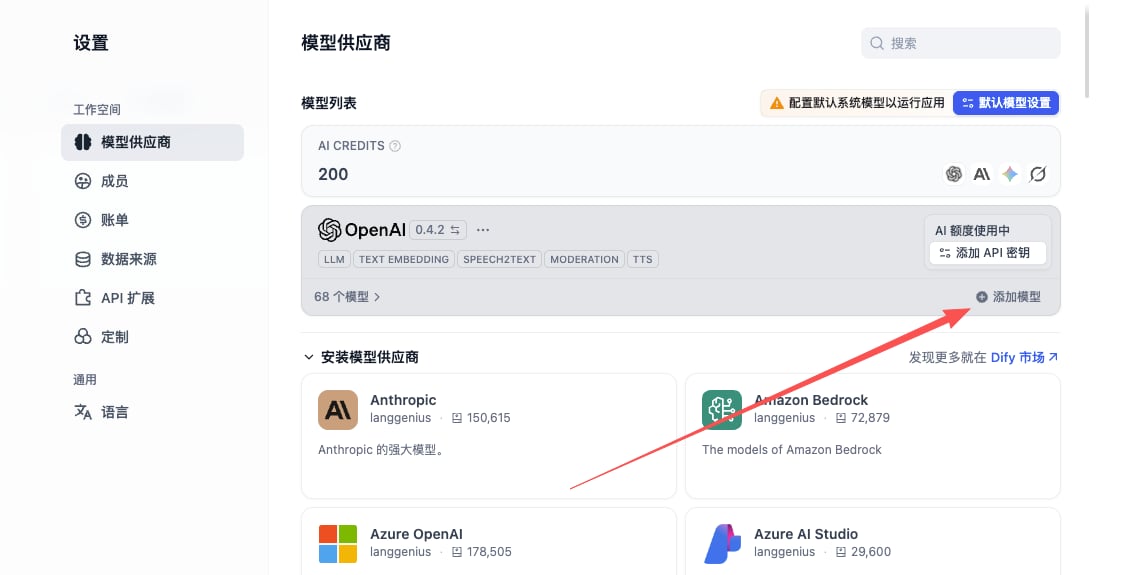
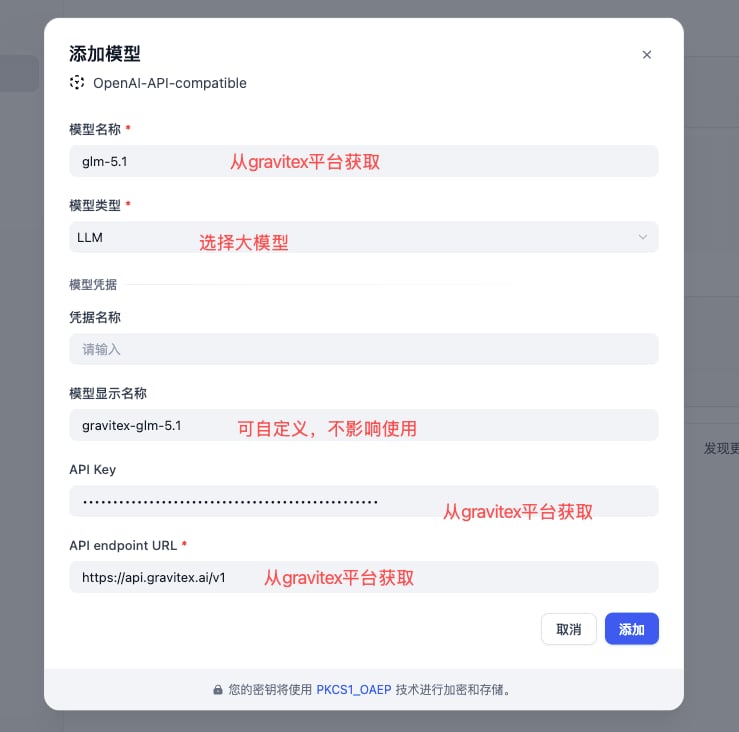
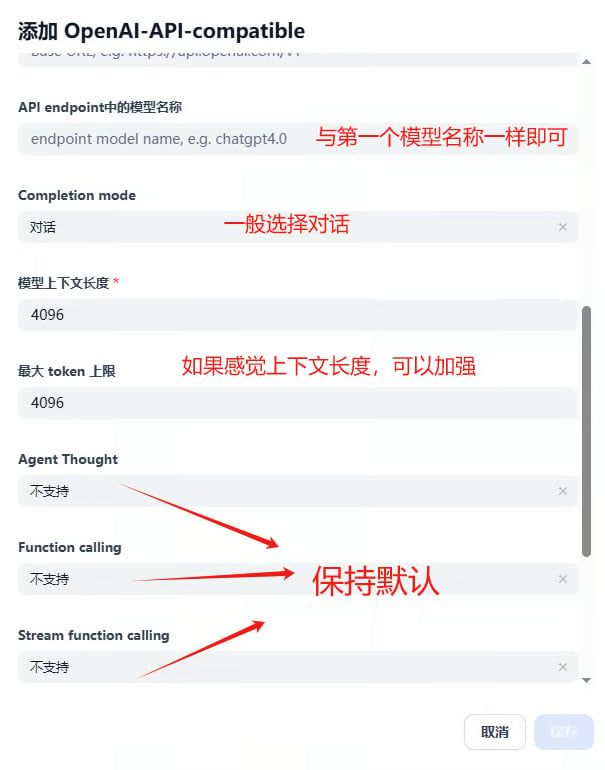
플러그인 설치 후 **Add Model**을 클릭하고 아래 세 가지 핵심 필드를 입력합니다:
**OpenAI-API-compatible**은 LLM / Embedding / TTS / STT 엔드포인트 유형을 지원합니다. GravitexAI는 완전 호환 — 하나의 플러그인으로 모든 모델을 커버합니다.
### 1.3 모델 추가
플러그인 설치 후 **Add Model**을 클릭하고 아래 세 가지 핵심 필드를 입력합니다:
 | Field | Value | Notes |
| ------------------------------ | --------------------------------------------------- | ----------------------------------------------------------------------------- |
| **Model Type** | LLM / Text Embedding / Speech2text … | 엔드포인트 유형과 일치 |
| **Model Name** | 예: `gpt-5.5`, `claude-opus-4-7`, `gemini-3.5-flash` | [정식 모델 ID](https://maas.gravitex.ai/#/api-models)여야 함. **임의 표시 이름은 작동하지 않음.** |
| **Display Name** | 예: `GPT-5.5`, `Claude Opus 4.7` | 읽기 쉬운 아무 이름; UI 전용 |
| **API Key** | [GravitexAI Console](https://maas.gravitex.ai)에서 복사 | 형식: `sk-xxxxxxxx` |
| **API endpoint URL** | `https://api.gravitex.ai/v1` | 끝의 `/v1`을 빼지 마세요 |
| **Model Name in API endpoint** | **"Model Name"과 동일** | Dify가 요청 본문의 `model` 필드로 전송 |
"**Model Name**"과 "**Model Name in API endpoint**"는 **동일**해야 합니다. 공백이 있는 친숙한 이름(예: `Gemini 3.5 Flash`)은 404 / model not found를 반환합니다.
### 1.4 Context Length
Dify 기본값은 `max_context = 4096`으로 대부분의 최신 모델보다 훨씬 낮습니다. 선택한 모델에 따라 재정의하세요:
| Model | Context |
| -------------------------------------------------- | --------- |
| `claude-opus-4-7` / `gpt-5.5` / `gemini-3.5-flash` | 1,000,000 |
| `claude-sonnet-4-5` / `claude-haiku-4-5` | 200,000 |
| `kimi-k2.5` | 256,000 |
| `deepseek-v3-2-251201` | 128,000 |
전체 컨텍스트 사양은 [모델 카탈로그](https://maas.gravitex.ai/#/api-models)에 있습니다.
## 2. 핵심 기능
### 2.1 Chat Assistant
가장 간단한 앱 유형 — 지원 봇, Q\&A, 역할극에 적합:
1. 앱 생성 → **Chat Assistant** 템플릿 선택
2. system prompt 구성:
```text theme={null}
You are the GravitexAI integration assistant. Your job:
- Answer questions about wiring up our API
- Recommend models that fit the user's scenario
- Refer the user to the docs or BD when unsure
Keep tone friendly, professional, and concise.
```
3. **`gpt-5.5`** 또는 \*\*`claude-opus-4-7`\*\*을 모델로 선택
4. 권장 매개변수: `temperature = 0.7`, `max_tokens = 2000`
### 2.2 Workflow Application
분기, 병렬 경로, 루프가 있는 다단계 DAG 구성:
```mermaid theme={null}
graph LR
A[User Input] --> B[Intent Detection]
B --> C{Branch}
C -->|Q&A| D[KB Retrieval]
C -->|Creative| E[Generation]
C -->|Analytical| F[Data Analysis]
D --> G[Assemble Reply]
E --> G
F --> G
G --> H[Output]
```
**노드별 모델 추천:**
* 의도 분류: `gemini-3.5-flash` (고처리량, 저지연)
* KB 검색 / embedding: `text-embedding-3-large` 또는 `gemini-embedding-001`
* 장문 추론: `claude-opus-4-7` (1M context, 강력한 추론)
* 코드 생성: `gpt-5.5` 또는 `qwen3-coder-plus`
### 2.3 Knowledge Base Q\&A (RAG)
1. **지식 베이스 생성** → 문서 업로드 (PDF / Word / Markdown / TXT)
2. **Embedding 모델**: `text-embedding-3-large` 권장
3. **청킹**: 문단별 자동 분할, 청크당 \~500 토큰
4. **앱에서 KB 참조**
5. **검색 매개변수**:
* Top-K: 3–5
* 유사도 임계값: 0.7
* **Reranker: 활성화** (관련성 크게 향상)
## 3. 애플리케이션 템플릿
```yaml theme={null}
type: chat assistant
model: gpt-5.5
system_prompt: |
You are a professional AI customer support agent. Responsibilities:
- Answer user questions
- Provide product information
- Handle post-sales support
Keep tone friendly and professional.
temperature: 0.7
max_tokens: 2000
```
```yaml theme={null}
type: workflow
input: uploaded document
pipeline:
1. Document parsing (Dify built-in parser)
2. Long-form summary (claude-opus-4-7, 1M context)
3. Structured highlight extraction
4. Generate report
output: Markdown report
```
```yaml theme={null}
type: chat assistant
model: claude-opus-4-7
system_prompt: |
You are a professional coding assistant, specialized in:
- Writing and refactoring code
- Debugging
- Architecture design
- Best-practice recommendations
Produce clear, runnable code with a brief explanation.
temperature: 0.3
```
## 4. 고급 기능
### 4.1 API를 통한 Dify 앱 호출
각 Dify 앱은 외부에서 호출 가능한 HTTP 서비스로 노출됩니다:
```python theme={null}
import requests
url = "https://your-dify-instance/v1/chat-messages"
headers = {
"Authorization": "Bearer YOUR_DIFY_APP_API_KEY",
"Content-Type": "application/json",
}
payload = {
"inputs": {},
"query": "Introduce GravitexAI in one sentence.",
"response_mode": "streaming",
"user": "user_123",
}
resp = requests.post(url, headers=headers, json=payload, stream=True)
for line in resp.iter_lines():
if line:
print(line.decode("utf-8"))
```
### 4.2 멀티모달 입력 (Vision)
비전 지원 모델(`gpt-5.5`, `claude-opus-4-7`, `gemini-3.5-flash`)은 이미지 입력을 수락합니다:
```python theme={null}
{
"inputs": {
"image": "data:image/jpeg;base64,...",
"instruction": "Identify the key information in this image."
},
"query": "Describe the image in detail and provide actionable insights."
}
```
### 4.3 배치 처리
대규모 워크로드(CSV 가져오기, 대량 요약 등)의 경우:
1. 빠르고 저렴한 모델 선택 (`gemini-3.5-flash`, `gpt 5.4 mini`)
2. Dify 워크플로에서 동시 실행 수 제한하여 rate limit 한 번에 도달 방지
3. 결과 캐싱 활성화하여 동일 입력 재과금 방지
## 5. 모델 선택
GravitexAI의 글쓰기, 코딩, 빠른 응답, 긴 컨텍스트, 이미지 생성 등 추천을 탐색하세요.
### 비용 최적화: dev vs prod
```yaml theme={null}
development:
model: gemini-3.5-flash # low cost, fast iteration
max_tokens: 1000
temperature: 0.7
production:
model: claude-opus-4-7 # flagship intelligence, reliable
max_tokens: 2000
temperature: 0.3
fallback: gpt-5.5 # GravitexAI auto-failover
```
GravitexAI는 **플랫폼 수준 자동 장애 조치**를 제공합니다. provider를 사용할 수 없으면 동등한 모델로 트래픽이 자동 라우팅됩니다 — Dify에서 수동 fallback 체인 불필요.
## 6. 모범 사례
### 6.1 구조화된 프롬프트
```text theme={null}
# Role
You are a professional [role here].
# Task
Help the user complete [the specific task].
# Output Format
1. Summary (≤ 100 words)
2. Detailed analysis (bullet points)
3. Recommended actions
# Constraints
- Be factual; flag uncertainty explicitly
- Keep total length under 500 words
- Respond in [language]
```
### 6.2 워크플로 설계
```mermaid theme={null}
graph TD
A[User input] --> B[Validation]
B --> C[Intent classification]
C --> D{Choose path}
D -->|Simple Q&A| E[Fast answer
| Field | Value | Notes |
| ------------------------------ | --------------------------------------------------- | ----------------------------------------------------------------------------- |
| **Model Type** | LLM / Text Embedding / Speech2text … | 엔드포인트 유형과 일치 |
| **Model Name** | 예: `gpt-5.5`, `claude-opus-4-7`, `gemini-3.5-flash` | [정식 모델 ID](https://maas.gravitex.ai/#/api-models)여야 함. **임의 표시 이름은 작동하지 않음.** |
| **Display Name** | 예: `GPT-5.5`, `Claude Opus 4.7` | 읽기 쉬운 아무 이름; UI 전용 |
| **API Key** | [GravitexAI Console](https://maas.gravitex.ai)에서 복사 | 형식: `sk-xxxxxxxx` |
| **API endpoint URL** | `https://api.gravitex.ai/v1` | 끝의 `/v1`을 빼지 마세요 |
| **Model Name in API endpoint** | **"Model Name"과 동일** | Dify가 요청 본문의 `model` 필드로 전송 |
"**Model Name**"과 "**Model Name in API endpoint**"는 **동일**해야 합니다. 공백이 있는 친숙한 이름(예: `Gemini 3.5 Flash`)은 404 / model not found를 반환합니다.
### 1.4 Context Length
Dify 기본값은 `max_context = 4096`으로 대부분의 최신 모델보다 훨씬 낮습니다. 선택한 모델에 따라 재정의하세요:
| Model | Context |
| -------------------------------------------------- | --------- |
| `claude-opus-4-7` / `gpt-5.5` / `gemini-3.5-flash` | 1,000,000 |
| `claude-sonnet-4-5` / `claude-haiku-4-5` | 200,000 |
| `kimi-k2.5` | 256,000 |
| `deepseek-v3-2-251201` | 128,000 |
전체 컨텍스트 사양은 [모델 카탈로그](https://maas.gravitex.ai/#/api-models)에 있습니다.
## 2. 핵심 기능
### 2.1 Chat Assistant
가장 간단한 앱 유형 — 지원 봇, Q\&A, 역할극에 적합:
1. 앱 생성 → **Chat Assistant** 템플릿 선택
2. system prompt 구성:
```text theme={null}
You are the GravitexAI integration assistant. Your job:
- Answer questions about wiring up our API
- Recommend models that fit the user's scenario
- Refer the user to the docs or BD when unsure
Keep tone friendly, professional, and concise.
```
3. **`gpt-5.5`** 또는 \*\*`claude-opus-4-7`\*\*을 모델로 선택
4. 권장 매개변수: `temperature = 0.7`, `max_tokens = 2000`
### 2.2 Workflow Application
분기, 병렬 경로, 루프가 있는 다단계 DAG 구성:
```mermaid theme={null}
graph LR
A[User Input] --> B[Intent Detection]
B --> C{Branch}
C -->|Q&A| D[KB Retrieval]
C -->|Creative| E[Generation]
C -->|Analytical| F[Data Analysis]
D --> G[Assemble Reply]
E --> G
F --> G
G --> H[Output]
```
**노드별 모델 추천:**
* 의도 분류: `gemini-3.5-flash` (고처리량, 저지연)
* KB 검색 / embedding: `text-embedding-3-large` 또는 `gemini-embedding-001`
* 장문 추론: `claude-opus-4-7` (1M context, 강력한 추론)
* 코드 생성: `gpt-5.5` 또는 `qwen3-coder-plus`
### 2.3 Knowledge Base Q\&A (RAG)
1. **지식 베이스 생성** → 문서 업로드 (PDF / Word / Markdown / TXT)
2. **Embedding 모델**: `text-embedding-3-large` 권장
3. **청킹**: 문단별 자동 분할, 청크당 \~500 토큰
4. **앱에서 KB 참조**
5. **검색 매개변수**:
* Top-K: 3–5
* 유사도 임계값: 0.7
* **Reranker: 활성화** (관련성 크게 향상)
## 3. 애플리케이션 템플릿
```yaml theme={null}
type: chat assistant
model: gpt-5.5
system_prompt: |
You are a professional AI customer support agent. Responsibilities:
- Answer user questions
- Provide product information
- Handle post-sales support
Keep tone friendly and professional.
temperature: 0.7
max_tokens: 2000
```
```yaml theme={null}
type: workflow
input: uploaded document
pipeline:
1. Document parsing (Dify built-in parser)
2. Long-form summary (claude-opus-4-7, 1M context)
3. Structured highlight extraction
4. Generate report
output: Markdown report
```
```yaml theme={null}
type: chat assistant
model: claude-opus-4-7
system_prompt: |
You are a professional coding assistant, specialized in:
- Writing and refactoring code
- Debugging
- Architecture design
- Best-practice recommendations
Produce clear, runnable code with a brief explanation.
temperature: 0.3
```
## 4. 고급 기능
### 4.1 API를 통한 Dify 앱 호출
각 Dify 앱은 외부에서 호출 가능한 HTTP 서비스로 노출됩니다:
```python theme={null}
import requests
url = "https://your-dify-instance/v1/chat-messages"
headers = {
"Authorization": "Bearer YOUR_DIFY_APP_API_KEY",
"Content-Type": "application/json",
}
payload = {
"inputs": {},
"query": "Introduce GravitexAI in one sentence.",
"response_mode": "streaming",
"user": "user_123",
}
resp = requests.post(url, headers=headers, json=payload, stream=True)
for line in resp.iter_lines():
if line:
print(line.decode("utf-8"))
```
### 4.2 멀티모달 입력 (Vision)
비전 지원 모델(`gpt-5.5`, `claude-opus-4-7`, `gemini-3.5-flash`)은 이미지 입력을 수락합니다:
```python theme={null}
{
"inputs": {
"image": "data:image/jpeg;base64,...",
"instruction": "Identify the key information in this image."
},
"query": "Describe the image in detail and provide actionable insights."
}
```
### 4.3 배치 처리
대규모 워크로드(CSV 가져오기, 대량 요약 등)의 경우:
1. 빠르고 저렴한 모델 선택 (`gemini-3.5-flash`, `gpt 5.4 mini`)
2. Dify 워크플로에서 동시 실행 수 제한하여 rate limit 한 번에 도달 방지
3. 결과 캐싱 활성화하여 동일 입력 재과금 방지
## 5. 모델 선택
GravitexAI의 글쓰기, 코딩, 빠른 응답, 긴 컨텍스트, 이미지 생성 등 추천을 탐색하세요.
### 비용 최적화: dev vs prod
```yaml theme={null}
development:
model: gemini-3.5-flash # low cost, fast iteration
max_tokens: 1000
temperature: 0.7
production:
model: claude-opus-4-7 # flagship intelligence, reliable
max_tokens: 2000
temperature: 0.3
fallback: gpt-5.5 # GravitexAI auto-failover
```
GravitexAI는 **플랫폼 수준 자동 장애 조치**를 제공합니다. provider를 사용할 수 없으면 동등한 모델로 트래픽이 자동 라우팅됩니다 — Dify에서 수동 fallback 체인 불필요.
## 6. 모범 사례
### 6.1 구조화된 프롬프트
```text theme={null}
# Role
You are a professional [role here].
# Task
Help the user complete [the specific task].
# Output Format
1. Summary (≤ 100 words)
2. Detailed analysis (bullet points)
3. Recommended actions
# Constraints
- Be factual; flag uncertainty explicitly
- Keep total length under 500 words
- Respond in [language]
```
### 6.2 워크플로 설계
```mermaid theme={null}
graph TD
A[User input] --> B[Validation]
B --> C[Intent classification]
C --> D{Choose path}
D -->|Simple Q&A| E[Fast answer
gemini-3.5-flash]
D -->|Deep analysis| F[Reasoning
claude-opus-4-7]
D -->|Needs retrieval| G[KB retrieval
+ reranker]
E --> H[Output]
F --> H
G --> I[Synthesize
gpt-5.5] --> H
```
### 6.3 관측 가능성
정기적으로 추적:
* ✅ 사용자 피드백 (thumbs up/down)
* ⏱️ P95 지연 시간
* 💰 호출당 비용 및 일/월 사용량 곡선
* ❌ 오류율 및 근본 원인 분포
GravitexAI 콘솔은 키별 및 모델별 사용량과 비용을 실시간으로 표시하여 정산이 쉽습니다.
### 6.4 버전 관리
* Dify 앱 설정(JSON / YAML)을 정기적으로 내보내 백업
* 카나리를 통해 새 버전 롤아웃; 롤백을 위해 최소 N-1 유지
* 프로덕션에서 모델 버전 고정하여 예기치 않은 동작 변경 방지
## 7. 문제 해결
**401 / invalid API key**
* [GravitexAI Console](https://maas.gravitex.ai)에서 API key 재복사
* 계정 잔액 확인
* baseURL이 `https://api.gravitex.ai/v1`인지 확인 (끝의 `/v1` 주의)
**404 / model not found**
* [정식 모델 ID](https://maas.gravitex.ai/#/api-models) 사용 (예: `gpt-5.5`, `GPT-5.5` 아님)
* "Model Name"과 "Model Name in API endpoint"가 동일해야 함
**스트리밍 느림 / 멈춤**
* Flash / Mini 티어 모델 선호
* `max_tokens` 줄이기
* Dify 응답 캐싱 켜기
### 성능 튜닝 템플릿
```yaml theme={null}
caching:
enabled: true
ttl: 3600s
key: identical input
concurrency:
max_in_flight: 10
queue_size: 100
timeout: 30s
resources:
memory: 2GB
cpu: 80%
```
## 8. 배포 권장사항
### 프로덕션 Docker Compose (셀프 호스트 Dify)
```yaml theme={null}
version: '3.8'
services:
dify-api:
image: langgenius/dify-api:latest
environment:
- SECRET_KEY=your-secret-key
- DB_HOST=postgres
- REDIS_HOST=redis
- OPENAI_API_KEY=sk-your-gravitex-key
- OPENAI_API_BASE=https://api.gravitex.ai/v1
depends_on:
- postgres
- redis
dify-web:
image: langgenius/dify-web:latest
ports:
- "3000:3000"
depends_on:
- dify-api
postgres:
image: postgres:14
environment:
- POSTGRES_DB=dify
- POSTGRES_USER=dify
- POSTGRES_PASSWORD=password
redis:
image: redis:alpine
```
### 보안
* API key를 환경 변수 또는 secrets manager에 저장 — **Dify 설정 내부에 하드코딩하지 마세요**
* Dify 앞에서 HTTPS 종료 (Nginx / Caddy / Traefik)
* Dify 관리 콘솔에 SSO / 2FA 활성화
* 베이스 이미지 및 의존성 최신 유지
### 헬스 체크
```python theme={null}
import requests, time
def monitor_dify():
try:
r = requests.get("http://dify-api:5001/health", timeout=5)
if r.status_code == 200:
print("Dify healthy")
else:
print(f"Unhealthy, status: {r.status_code}")
except Exception as e:
print(f"Probe failed: {e}")
while True:
monitor_dify()
time.sleep(60)
```
## 9. 정산 및 인사이트
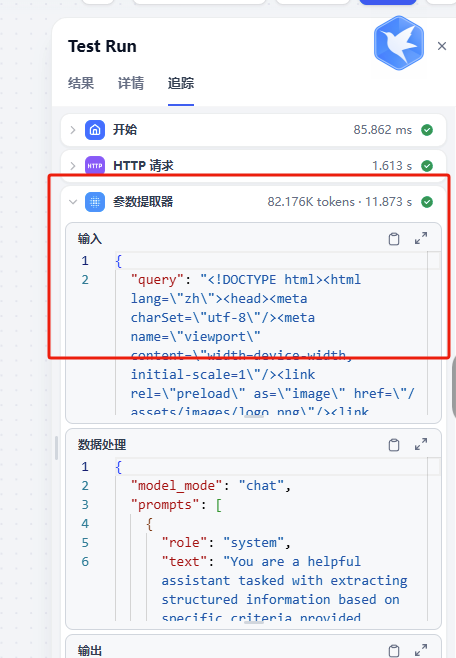
연동 후 [GravitexAI Console](https://maas.gravitex.ai)에서 요청량, 토큰 소비, 비용 분석, 모델별 성공률을 확인하세요:
 * 항상 [정식 모델 ID](https://maas.gravitex.ai/#/api-models) 사용 (소문자, 공식 ID와 정확히 일치)
* 표준 API base: `https://api.gravitex.ai/v1`
* `gemini-3.5-flash` 같은 빠르고 저렴한 모델로 전체 워크플로를 반복한 뒤, 프로덕션에서 `claude-opus-4-7` / `gpt-5.5`로 교체
* 대량 워크로드는 [bd@gravitex.ai](mailto:bd@gravitex.ai)로 전용 할당량 문의
* 항상 [정식 모델 ID](https://maas.gravitex.ai/#/api-models) 사용 (소문자, 공식 ID와 정확히 일치)
* 표준 API base: `https://api.gravitex.ai/v1`
* `gemini-3.5-flash` 같은 빠르고 저렴한 모델로 전체 워크플로를 반복한 뒤, 프로덕션에서 `claude-opus-4-7` / `gpt-5.5`로 교체
* 대량 워크로드는 [bd@gravitex.ai](mailto:bd@gravitex.ai)로 전용 할당량 문의