> ## Documentation Index
> Fetch the complete documentation index at: https://docs.gravitex.ai/llms.txt
> Use this file to discover all available pages before exploring further.
# Dify
> Visual LLM application platform integration guide with GravitexAI
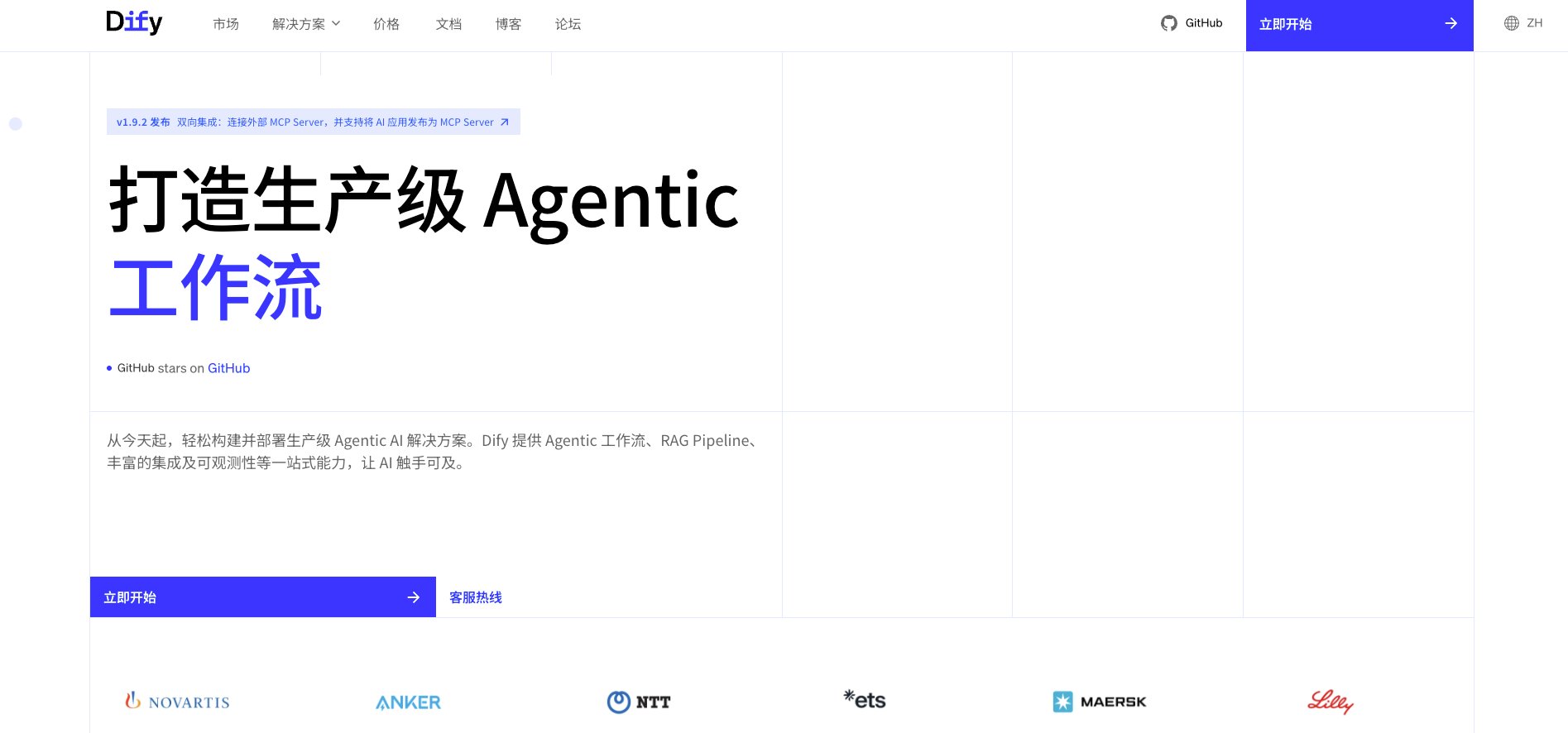
[Dify](https://dify.ai) is an open-source LLM application development platform that offers visual orchestration, knowledge bases, workflows, and API services — letting you ship chatbots, agents, and RAG apps quickly.
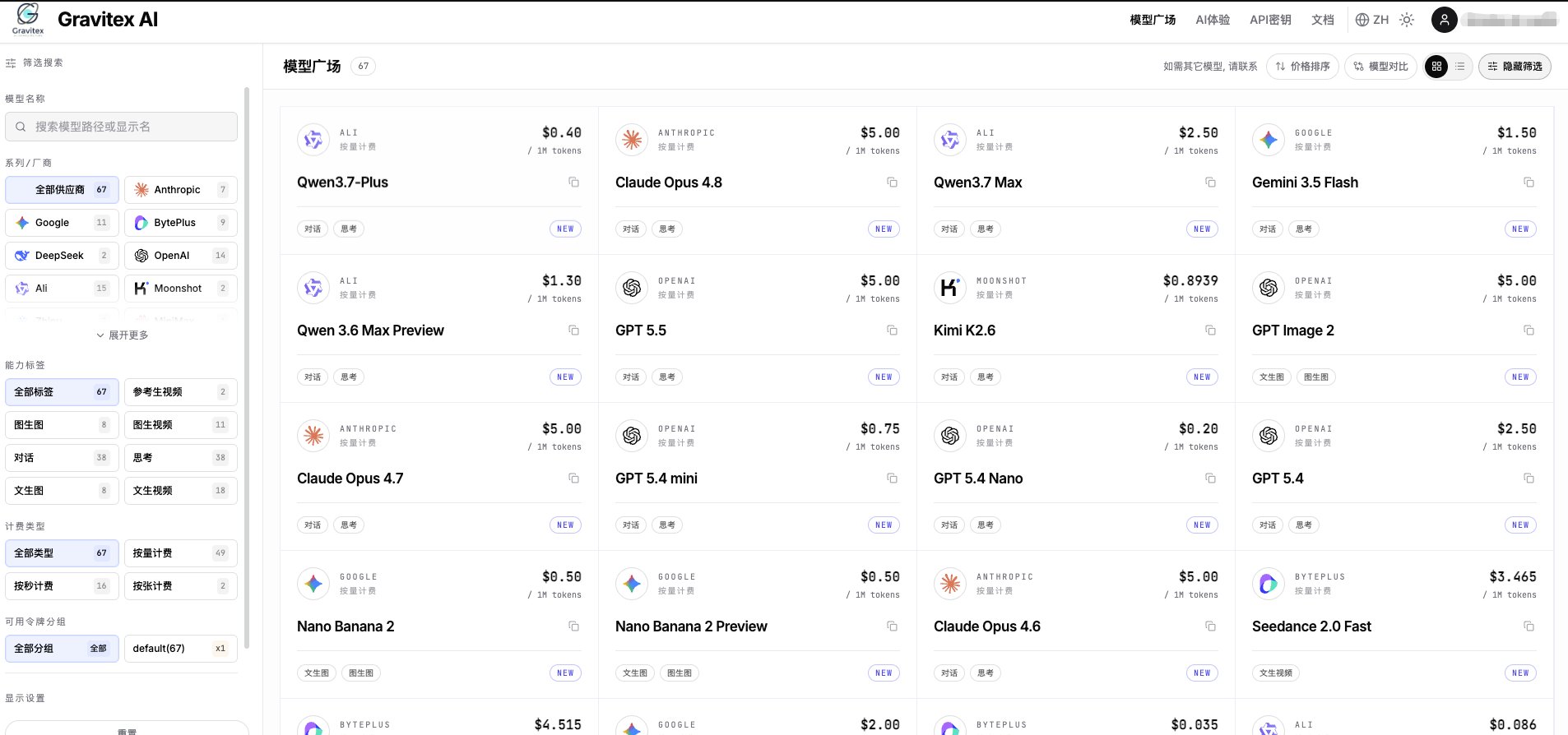
With GravitexAI, you can drive Dify with a single API key against **100+ leading models** (Claude, OpenAI, Gemini, Qwen, DeepSeek, Kimi, and more) while benefiting from unified billing, automatic failover, and enterprise-grade reliability.
 ## 1. Quick Integration
### 1.1 Get an API Key
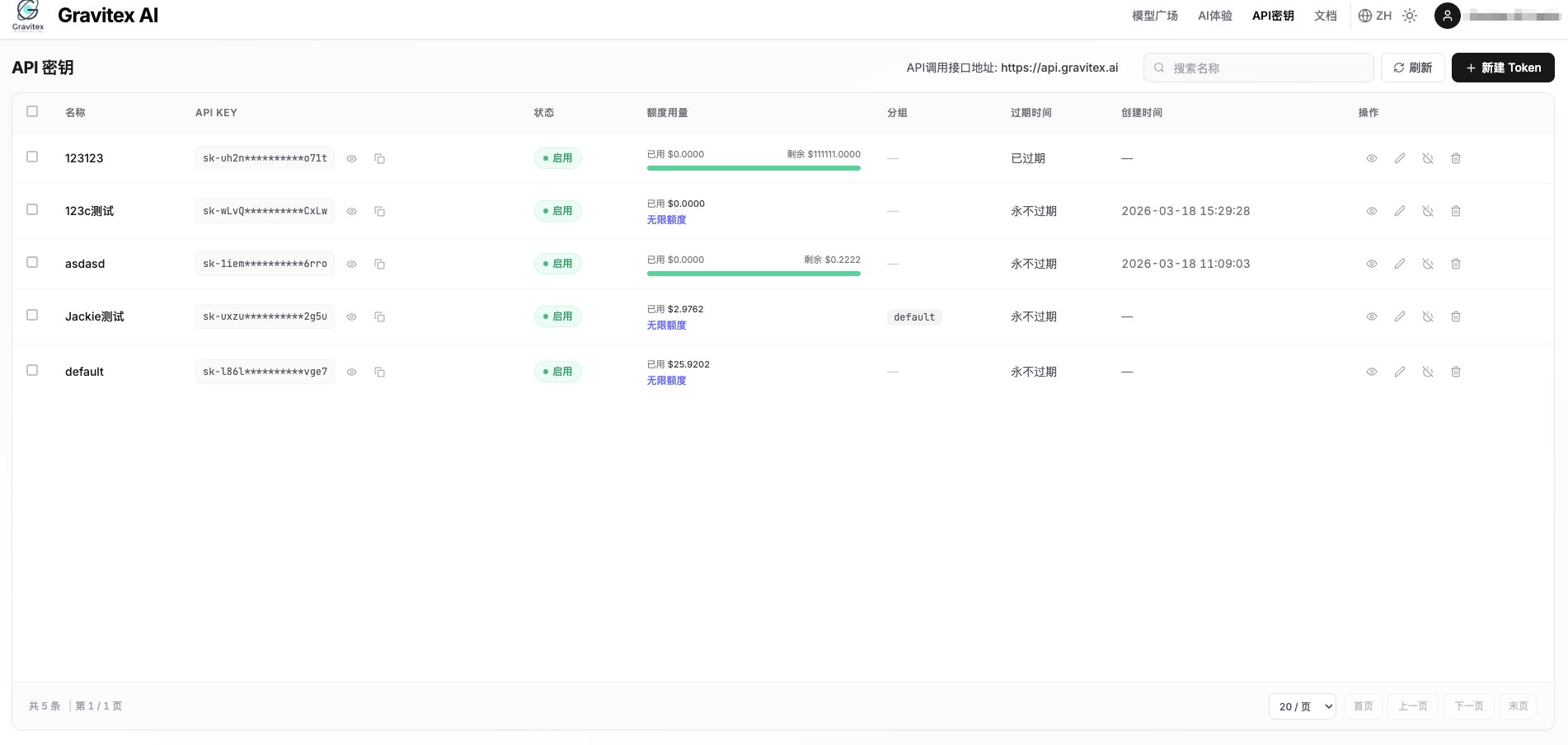
Visit the [GravitexAI Console](https://maas.gravitex.ai) and create an API key:
## 1. Quick Integration
### 1.1 Get an API Key
Visit the [GravitexAI Console](https://maas.gravitex.ai) and create an API key:
 ### 1.2 Open Dify Model Providers
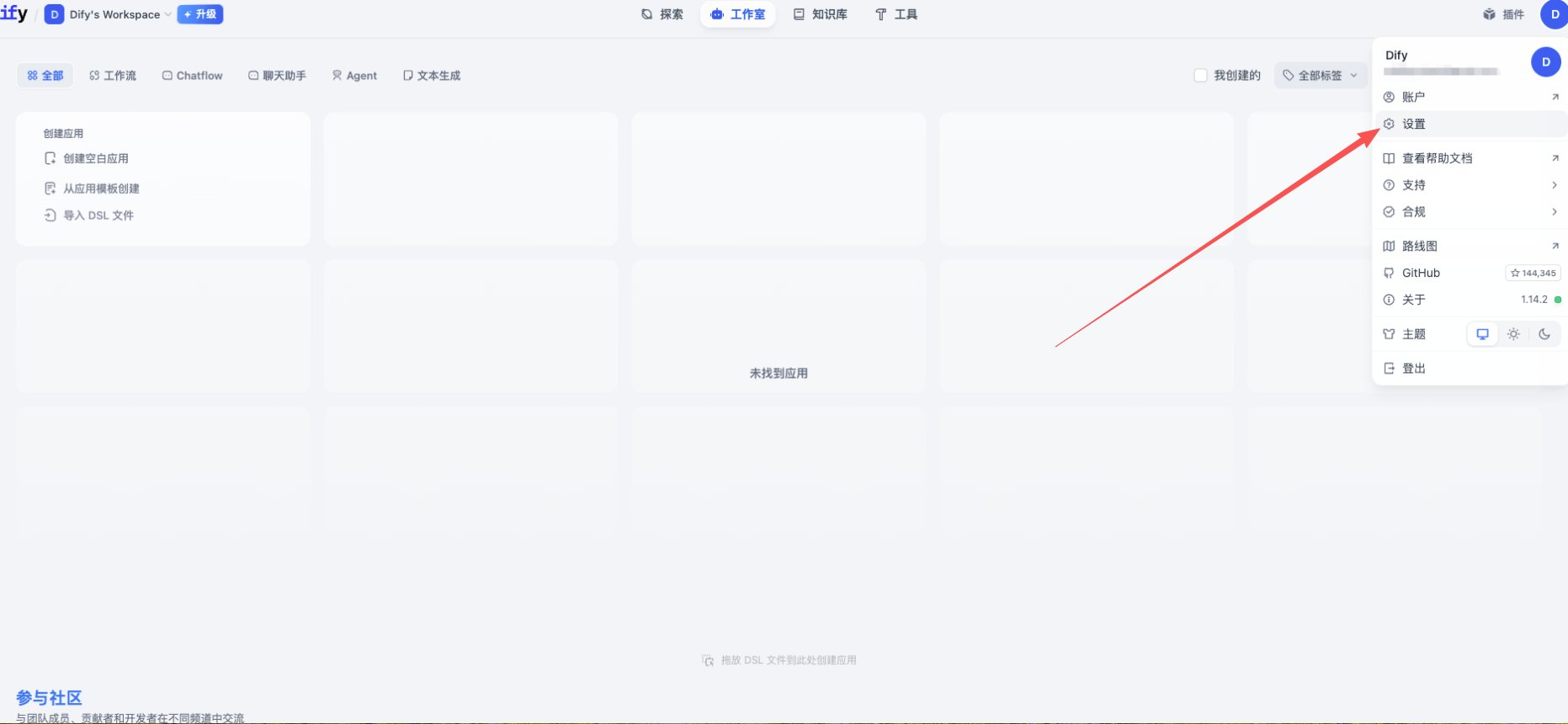
1. Log in to Dify, click your avatar (top-right) → **Settings**
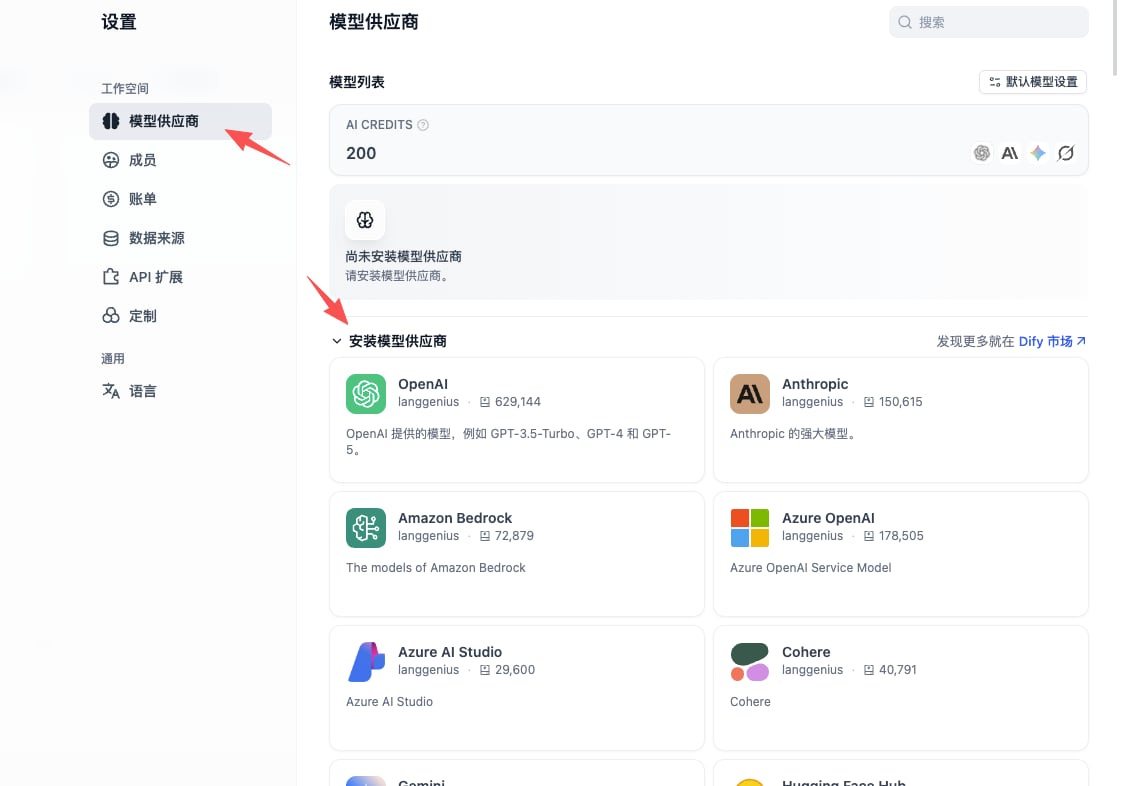
2. From the left menu, choose **Model Provider**
3. Find the **OpenAI-API-compatible** plugin in the list and install it
### 1.2 Open Dify Model Providers
1. Log in to Dify, click your avatar (top-right) → **Settings**
2. From the left menu, choose **Model Provider**
3. Find the **OpenAI-API-compatible** plugin in the list and install it
 **OpenAI-API-compatible** supports LLM / Embedding / TTS / STT endpoint types. GravitexAI is fully compatible — one plugin covers every model.
### 1.3 Add a Model
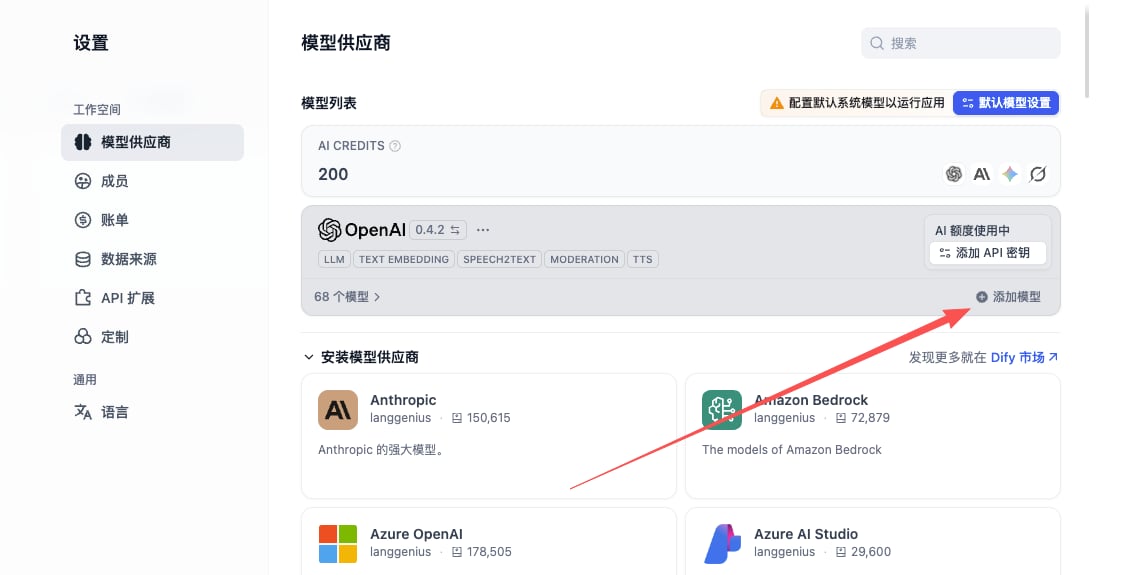
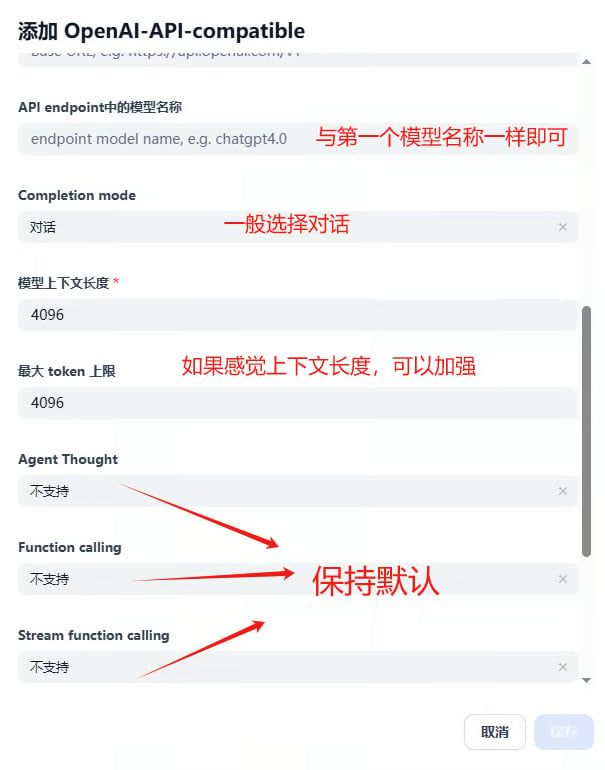
After installing the plugin, click **Add Model** and fill in the three core fields below:
**OpenAI-API-compatible** supports LLM / Embedding / TTS / STT endpoint types. GravitexAI is fully compatible — one plugin covers every model.
### 1.3 Add a Model
After installing the plugin, click **Add Model** and fill in the three core fields below:
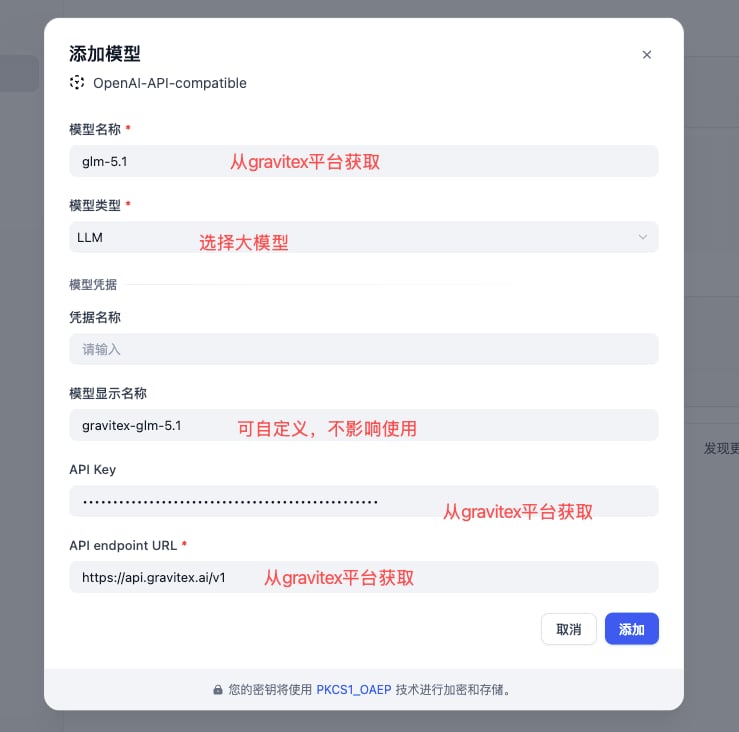 | Field | Value | Notes |
| ------------------------------ | ------------------------------------------------------------ | ------------------------------------------------------------------------------------------------------------------- |
| **Model Type** | LLM / Text Embedding / Speech2text … | Match the endpoint type |
| **Model Name** | e.g. `gpt-5.5`, `claude-opus-4-7`, `gemini-3.5-flash` | Must be the [canonical model ID](https://maas.gravitex.ai/#/api-models). **Free-form display names will not work.** |
| **Display Name** | e.g. `GPT-5.5`, `Claude Opus 4.7` | Anything readable; UI only |
| **API Key** | Copy from the [GravitexAI Console](https://maas.gravitex.ai) | Format: `sk-xxxxxxxx` |
| **API endpoint URL** | `https://api.gravitex.ai/v1` | Don't drop the trailing `/v1` |
| **Model Name in API endpoint** | **Identical to "Model Name"** | Dify sends this as the `model` field in the request body |
"**Model Name**" and "**Model Name in API endpoint**" must be **identical**. Friendly names with spaces (e.g. `Gemini 3.5 Flash`) will return 404 / model not found.
### 1.4 Context Length
Dify defaults to `max_context = 4096`, which is far below most modern models. Override it based on the model you choose:
| Model | Context |
| -------------------------------------------------- | --------- |
| `claude-opus-4-7` / `gpt-5.5` / `gemini-3.5-flash` | 1,000,000 |
| `claude-sonnet-4-5` / `claude-haiku-4-5` | 200,000 |
| `kimi-k2.5` | 256,000 |
| `deepseek-v3-2-251201` | 128,000 |
Full context specs live on the [model catalog](https://maas.gravitex.ai/#/api-models).
## 2. Core Features
### 2.1 Chat Assistant
The simplest app type — great for support bots, Q\&A, and role-play:
1. Create app → choose **Chat Assistant** template
2. Configure the system prompt:
```text theme={null}
You are the GravitexAI integration assistant. Your job:
- Answer questions about wiring up our API
- Recommend models that fit the user's scenario
- Refer the user to the docs or BD when unsure
Keep tone friendly, professional, and concise.
```
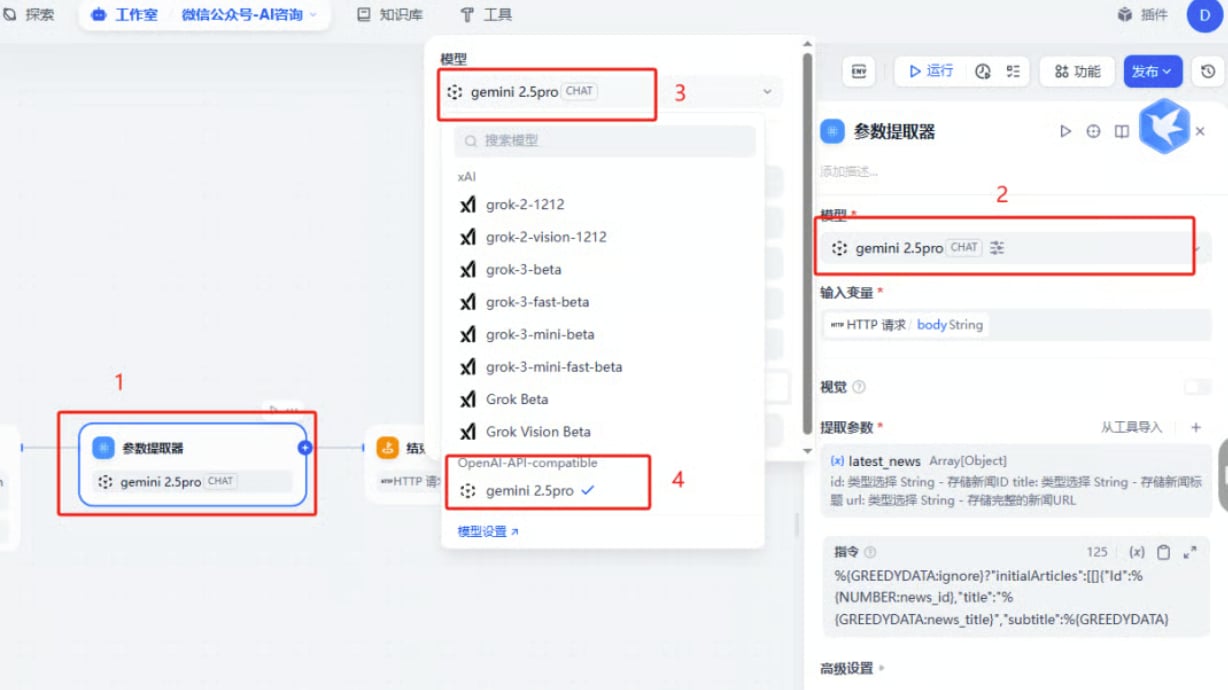
3. Pick **`gpt-5.5`** or **`claude-opus-4-7`** as the model
4. Suggested parameters: `temperature = 0.7`, `max_tokens = 2000`
### 2.2 Workflow Application
Compose multi-step DAGs with branches, parallel paths, and loops:
```mermaid theme={null}
graph LR
A[User Input] --> B[Intent Detection]
B --> C{Branch}
C -->|Q&A| D[KB Retrieval]
C -->|Creative| E[Generation]
C -->|Analytical| F[Data Analysis]
D --> G[Assemble Reply]
E --> G
F --> G
G --> H[Output]
```
**Node-by-node model suggestions:**
* Intent classification: `gemini-3.5-flash` (high throughput, low latency)
* KB retrieval / embedding: `text-embedding-3-large` or `gemini-embedding-001`
* Long-doc reasoning: `claude-opus-4-7` (1M context, strong reasoning)
* Code generation: `gpt-5.5` or `qwen3-coder-plus`
### 2.3 Knowledge Base Q\&A (RAG)
1. **Create a knowledge base** → upload documents (PDF / Word / Markdown / TXT)
2. **Embedding model**: `text-embedding-3-large` recommended
3. **Chunking**: auto-split by paragraph, \~500 tokens per chunk
4. **Reference the KB in the app**
5. **Retrieval parameters**:
* Top-K: 3–5
* Similarity threshold: 0.7
* **Reranker: enabled** (significantly improves relevance)
## 3. Application Templates
```yaml theme={null}
type: chat assistant
model: gpt-5.5
system_prompt: |
You are a professional AI customer support agent. Responsibilities:
- Answer user questions
- Provide product information
- Handle post-sales support
Keep tone friendly and professional.
temperature: 0.7
max_tokens: 2000
```
```yaml theme={null}
type: workflow
input: uploaded document
pipeline:
1. Document parsing (Dify built-in parser)
2. Long-form summary (claude-opus-4-7, 1M context)
3. Structured highlight extraction
4. Generate report
output: Markdown report
```
```yaml theme={null}
type: chat assistant
model: claude-opus-4-7
system_prompt: |
You are a professional coding assistant, specialized in:
- Writing and refactoring code
- Debugging
- Architecture design
- Best-practice recommendations
Produce clear, runnable code with a brief explanation.
temperature: 0.3
```
## 4. Advanced Features
### 4.1 Call Dify Apps via API
Each Dify app is exposed as an HTTP service that can be called from outside:
```python theme={null}
import requests
url = "https://your-dify-instance/v1/chat-messages"
headers = {
"Authorization": "Bearer YOUR_DIFY_APP_API_KEY",
"Content-Type": "application/json",
}
payload = {
"inputs": {},
"query": "Introduce GravitexAI in one sentence.",
"response_mode": "streaming",
"user": "user_123",
}
resp = requests.post(url, headers=headers, json=payload, stream=True)
for line in resp.iter_lines():
if line:
print(line.decode("utf-8"))
```
### 4.2 Multimodal Input (Vision)
Vision-capable models (`gpt-5.5`, `claude-opus-4-7`, `gemini-3.5-flash`) accept image input:
```python theme={null}
{
"inputs": {
"image": "data:image/jpeg;base64,...",
"instruction": "Identify the key information in this image."
},
"query": "Describe the image in detail and provide actionable insights."
}
```
### 4.3 Batch Processing
For large-scale workloads (CSV imports, bulk summarization, etc.):
1. Pick a fast/cheap model (`gemini-3.5-flash`, `gpt 5.4 mini`)
2. Cap concurrency in your Dify workflow to avoid hitting rate limits all at once
3. Enable result caching to avoid re-billing identical inputs
## 5. Model Selection
Browse GravitexAI's recommendations across writing, coding, fast response, long-context, image generation, and more.
### Cost optimization: dev vs prod
```yaml theme={null}
development:
model: gemini-3.5-flash # low cost, fast iteration
max_tokens: 1000
temperature: 0.7
production:
model: claude-opus-4-7 # flagship intelligence, reliable
max_tokens: 2000
temperature: 0.3
fallback: gpt-5.5 # GravitexAI auto-failover
```
GravitexAI provides **platform-level automatic failover**. If a provider is unavailable, traffic is routed to an equivalent model automatically — no manual fallback chain in Dify required.
## 6. Best Practices
### 6.1 Structured prompts
```text theme={null}
# Role
You are a professional [role here].
# Task
Help the user complete [the specific task].
# Output Format
1. Summary (≤ 100 words)
2. Detailed analysis (bullet points)
3. Recommended actions
# Constraints
- Be factual; flag uncertainty explicitly
- Keep total length under 500 words
- Respond in [language]
```
### 6.2 Workflow design
```mermaid theme={null}
graph TD
A[User input] --> B[Validation]
B --> C[Intent classification]
C --> D{Choose path}
D -->|Simple Q&A| E[Fast answer
| Field | Value | Notes |
| ------------------------------ | ------------------------------------------------------------ | ------------------------------------------------------------------------------------------------------------------- |
| **Model Type** | LLM / Text Embedding / Speech2text … | Match the endpoint type |
| **Model Name** | e.g. `gpt-5.5`, `claude-opus-4-7`, `gemini-3.5-flash` | Must be the [canonical model ID](https://maas.gravitex.ai/#/api-models). **Free-form display names will not work.** |
| **Display Name** | e.g. `GPT-5.5`, `Claude Opus 4.7` | Anything readable; UI only |
| **API Key** | Copy from the [GravitexAI Console](https://maas.gravitex.ai) | Format: `sk-xxxxxxxx` |
| **API endpoint URL** | `https://api.gravitex.ai/v1` | Don't drop the trailing `/v1` |
| **Model Name in API endpoint** | **Identical to "Model Name"** | Dify sends this as the `model` field in the request body |
"**Model Name**" and "**Model Name in API endpoint**" must be **identical**. Friendly names with spaces (e.g. `Gemini 3.5 Flash`) will return 404 / model not found.
### 1.4 Context Length
Dify defaults to `max_context = 4096`, which is far below most modern models. Override it based on the model you choose:
| Model | Context |
| -------------------------------------------------- | --------- |
| `claude-opus-4-7` / `gpt-5.5` / `gemini-3.5-flash` | 1,000,000 |
| `claude-sonnet-4-5` / `claude-haiku-4-5` | 200,000 |
| `kimi-k2.5` | 256,000 |
| `deepseek-v3-2-251201` | 128,000 |
Full context specs live on the [model catalog](https://maas.gravitex.ai/#/api-models).
## 2. Core Features
### 2.1 Chat Assistant
The simplest app type — great for support bots, Q\&A, and role-play:
1. Create app → choose **Chat Assistant** template
2. Configure the system prompt:
```text theme={null}
You are the GravitexAI integration assistant. Your job:
- Answer questions about wiring up our API
- Recommend models that fit the user's scenario
- Refer the user to the docs or BD when unsure
Keep tone friendly, professional, and concise.
```
3. Pick **`gpt-5.5`** or **`claude-opus-4-7`** as the model
4. Suggested parameters: `temperature = 0.7`, `max_tokens = 2000`
### 2.2 Workflow Application
Compose multi-step DAGs with branches, parallel paths, and loops:
```mermaid theme={null}
graph LR
A[User Input] --> B[Intent Detection]
B --> C{Branch}
C -->|Q&A| D[KB Retrieval]
C -->|Creative| E[Generation]
C -->|Analytical| F[Data Analysis]
D --> G[Assemble Reply]
E --> G
F --> G
G --> H[Output]
```
**Node-by-node model suggestions:**
* Intent classification: `gemini-3.5-flash` (high throughput, low latency)
* KB retrieval / embedding: `text-embedding-3-large` or `gemini-embedding-001`
* Long-doc reasoning: `claude-opus-4-7` (1M context, strong reasoning)
* Code generation: `gpt-5.5` or `qwen3-coder-plus`
### 2.3 Knowledge Base Q\&A (RAG)
1. **Create a knowledge base** → upload documents (PDF / Word / Markdown / TXT)
2. **Embedding model**: `text-embedding-3-large` recommended
3. **Chunking**: auto-split by paragraph, \~500 tokens per chunk
4. **Reference the KB in the app**
5. **Retrieval parameters**:
* Top-K: 3–5
* Similarity threshold: 0.7
* **Reranker: enabled** (significantly improves relevance)
## 3. Application Templates
```yaml theme={null}
type: chat assistant
model: gpt-5.5
system_prompt: |
You are a professional AI customer support agent. Responsibilities:
- Answer user questions
- Provide product information
- Handle post-sales support
Keep tone friendly and professional.
temperature: 0.7
max_tokens: 2000
```
```yaml theme={null}
type: workflow
input: uploaded document
pipeline:
1. Document parsing (Dify built-in parser)
2. Long-form summary (claude-opus-4-7, 1M context)
3. Structured highlight extraction
4. Generate report
output: Markdown report
```
```yaml theme={null}
type: chat assistant
model: claude-opus-4-7
system_prompt: |
You are a professional coding assistant, specialized in:
- Writing and refactoring code
- Debugging
- Architecture design
- Best-practice recommendations
Produce clear, runnable code with a brief explanation.
temperature: 0.3
```
## 4. Advanced Features
### 4.1 Call Dify Apps via API
Each Dify app is exposed as an HTTP service that can be called from outside:
```python theme={null}
import requests
url = "https://your-dify-instance/v1/chat-messages"
headers = {
"Authorization": "Bearer YOUR_DIFY_APP_API_KEY",
"Content-Type": "application/json",
}
payload = {
"inputs": {},
"query": "Introduce GravitexAI in one sentence.",
"response_mode": "streaming",
"user": "user_123",
}
resp = requests.post(url, headers=headers, json=payload, stream=True)
for line in resp.iter_lines():
if line:
print(line.decode("utf-8"))
```
### 4.2 Multimodal Input (Vision)
Vision-capable models (`gpt-5.5`, `claude-opus-4-7`, `gemini-3.5-flash`) accept image input:
```python theme={null}
{
"inputs": {
"image": "data:image/jpeg;base64,...",
"instruction": "Identify the key information in this image."
},
"query": "Describe the image in detail and provide actionable insights."
}
```
### 4.3 Batch Processing
For large-scale workloads (CSV imports, bulk summarization, etc.):
1. Pick a fast/cheap model (`gemini-3.5-flash`, `gpt 5.4 mini`)
2. Cap concurrency in your Dify workflow to avoid hitting rate limits all at once
3. Enable result caching to avoid re-billing identical inputs
## 5. Model Selection
Browse GravitexAI's recommendations across writing, coding, fast response, long-context, image generation, and more.
### Cost optimization: dev vs prod
```yaml theme={null}
development:
model: gemini-3.5-flash # low cost, fast iteration
max_tokens: 1000
temperature: 0.7
production:
model: claude-opus-4-7 # flagship intelligence, reliable
max_tokens: 2000
temperature: 0.3
fallback: gpt-5.5 # GravitexAI auto-failover
```
GravitexAI provides **platform-level automatic failover**. If a provider is unavailable, traffic is routed to an equivalent model automatically — no manual fallback chain in Dify required.
## 6. Best Practices
### 6.1 Structured prompts
```text theme={null}
# Role
You are a professional [role here].
# Task
Help the user complete [the specific task].
# Output Format
1. Summary (≤ 100 words)
2. Detailed analysis (bullet points)
3. Recommended actions
# Constraints
- Be factual; flag uncertainty explicitly
- Keep total length under 500 words
- Respond in [language]
```
### 6.2 Workflow design
```mermaid theme={null}
graph TD
A[User input] --> B[Validation]
B --> C[Intent classification]
C --> D{Choose path}
D -->|Simple Q&A| E[Fast answer
gemini-3.5-flash]
D -->|Deep analysis| F[Reasoning
claude-opus-4-7]
D -->|Needs retrieval| G[KB retrieval
+ reranker]
E --> H[Output]
F --> H
G --> I[Synthesize
gpt-5.5] --> H
```
### 6.3 Observability
Track regularly:
* ✅ User feedback (thumbs up/down)
* ⏱️ P95 latency
* 💰 Cost per call and daily/monthly usage curve
* ❌ Error rate and root cause distribution
The GravitexAI console shows per-key and per-model usage and cost in real time for easy reconciliation.
### 6.4 Versioning
* Regularly export Dify app configs (JSON / YAML) as backups
* Roll out new versions via canary; keep at least N-1 for rollback
* Pin model versions in production to avoid surprise behavior changes
## 7. Troubleshooting
**401 / invalid API key**
* Re-copy the API key from the [GravitexAI Console](https://maas.gravitex.ai)
* Verify the account has balance
* Confirm baseURL is `https://api.gravitex.ai/v1` (note the trailing `/v1`)
**404 / model not found**
* Use the [canonical model ID](https://maas.gravitex.ai/#/api-models) (e.g. `gpt-5.5`, not `GPT-5.5`)
* "Model Name" and "Model Name in API endpoint" must be identical
**Slow streaming / hangs**
* Prefer Flash / Mini tier models
* Reduce `max_tokens`
* Turn on Dify response caching
### Performance tuning template
```yaml theme={null}
caching:
enabled: true
ttl: 3600s
key: identical input
concurrency:
max_in_flight: 10
queue_size: 100
timeout: 30s
resources:
memory: 2GB
cpu: 80%
```
## 8. Deployment Recommendations
### Production Docker Compose (self-hosted Dify)
```yaml theme={null}
version: '3.8'
services:
dify-api:
image: langgenius/dify-api:latest
environment:
- SECRET_KEY=your-secret-key
- DB_HOST=postgres
- REDIS_HOST=redis
- OPENAI_API_KEY=sk-your-gravitex-key
- OPENAI_API_BASE=https://api.gravitex.ai/v1
depends_on:
- postgres
- redis
dify-web:
image: langgenius/dify-web:latest
ports:
- "3000:3000"
depends_on:
- dify-api
postgres:
image: postgres:14
environment:
- POSTGRES_DB=dify
- POSTGRES_USER=dify
- POSTGRES_PASSWORD=password
redis:
image: redis:alpine
```
### Security
* Store the API key in env vars or a secrets manager — **never hardcode it inside Dify configs**
* Terminate HTTPS in front of Dify (Nginx / Caddy / Traefik)
* Enable SSO / 2FA for the Dify admin console
* Keep base images and dependencies up to date
### Health checks
```python theme={null}
import requests, time
def monitor_dify():
try:
r = requests.get("http://dify-api:5001/health", timeout=5)
if r.status_code == 200:
print("Dify healthy")
else:
print(f"Unhealthy, status: {r.status_code}")
except Exception as e:
print(f"Probe failed: {e}")
while True:
monitor_dify()
time.sleep(60)
```
## 9. Reconciliation & Insights
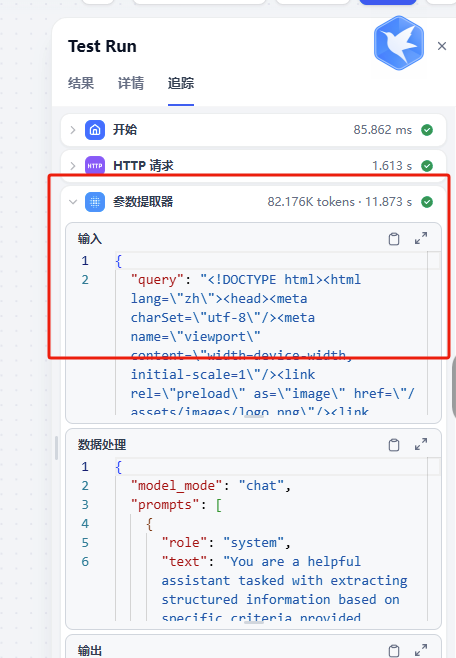
Once integrated, head back to the [GravitexAI Console](https://maas.gravitex.ai) to see request volume, token consumption, cost breakdown, and per-model success rates:
 * Always use the [canonical model ID](https://maas.gravitex.ai/#/api-models) (lowercase, exactly matching the official ID)
* Standard API base: `https://api.gravitex.ai/v1`
* Iterate on the full workflow with a fast/cheap model like `gemini-3.5-flash`, then swap to `claude-opus-4-7` / `gpt-5.5` for production
* For high-volume workloads, reach out to [bd@gravitex.ai](mailto:bd@gravitex.ai) for dedicated quotas
* Always use the [canonical model ID](https://maas.gravitex.ai/#/api-models) (lowercase, exactly matching the official ID)
* Standard API base: `https://api.gravitex.ai/v1`
* Iterate on the full workflow with a fast/cheap model like `gemini-3.5-flash`, then swap to `claude-opus-4-7` / `gpt-5.5` for production
* For high-volume workloads, reach out to [bd@gravitex.ai](mailto:bd@gravitex.ai) for dedicated quotas