> ## Documentation Index
> Fetch the complete documentation index at: https://docs.gravitex.ai/llms.txt
> Use this file to discover all available pages before exploring further.
# ChatHub
> ChatHub Browser Extension Integration Guide
> A browser-extension AI client for side-by-side multi-model answers, with 100+ models via GravitexAI
## 1. Overview
ChatHub is a Chrome / Edge browser extension that lets you use multiple AI models at once. One prompt can return answers from up to six models side by side, so you can quickly see which model fits the task. With GravitexAI you can connect OpenAI, Claude, Gemini, DeepSeek, Qwen, and 100+ other mainstream models in ChatHub.
## 2. Core capability: side-by-side comparison
ChatHub’s main differentiator is **parallel multi-model Q\&A**:
* Send the same question to 2–6 models in one tab
* Compare answers in **side-by-side** or **table** views
* Mix any models: GPT-5.5 + Claude Opus 4.7 + Gemini 3 Pro + DeepSeek V4 together
* Comparison views support Markdown, code highlighting, and image preview
**Typical use cases**
* Coding / debugging: compare GPT-5.5 and Claude Opus 4.7 fixes side by side
* Long-form writing: compare Claude Sonnet vs Qwen3.7 Chinese style
* Translation / summarization: send the same text to GPT-5.5, Gemini 3 Flash, and DeepSeek V4
* Model selection: run one benchmark question across models before picking a daily driver
## 3. Install
**Option A: Install from the store (recommended)**
1. Search the Chrome Web Store for: ChatHub‑All‑in‑One Chatbot (publisher: chathub.gg)
2. Click Add to Chrome → Add extension
3. Open the puzzle icon (Extensions) in the toolbar, find ChatHub, and pin it
**Option B: Offline / manual install (no store access)**
1. Download the Release zip from GitHub
2. Open `chrome://extensions/` and enable Developer mode
3. Load unpacked extension and select the unzipped `dist` folder
Download ChatHub from [https://chathub.gg/zh-CN/download](https://chathub.gg/zh-CN/download).
* Only the browser extension supports **Custom Chatbots**
* Web app (app.chathub.gg) and desktop client: no custom API entry yet
* Custom chatbots **only support OpenAI-compatible APIs**
## 4. Quick setup (OpenAI-compatible)
This is the most common path and works with all 100+ GravitexAI models.
### Step 1: Get a GravitexAI API Key
1. Open the [GravitexAI Console](https://maas.gravitex.ai/#/api-keys)
2. Click **Create API Key**, name it, and save
3. Copy the key starting with `sk-` for later
### Step 2: Open ChatHub settings
1. Click the ChatHub icon in the browser extensions menu to open the app
2. Click **Settings** (gear) at the bottom left to open full settings
3. Scroll to **Custom Bots** and click **Add**
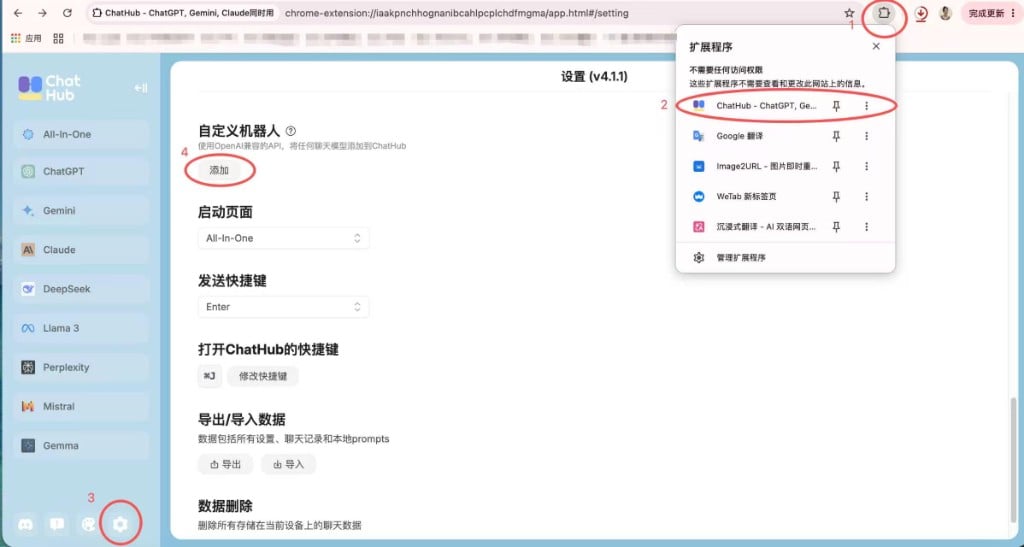 ### Step 3: Add GravitexAI as a provider
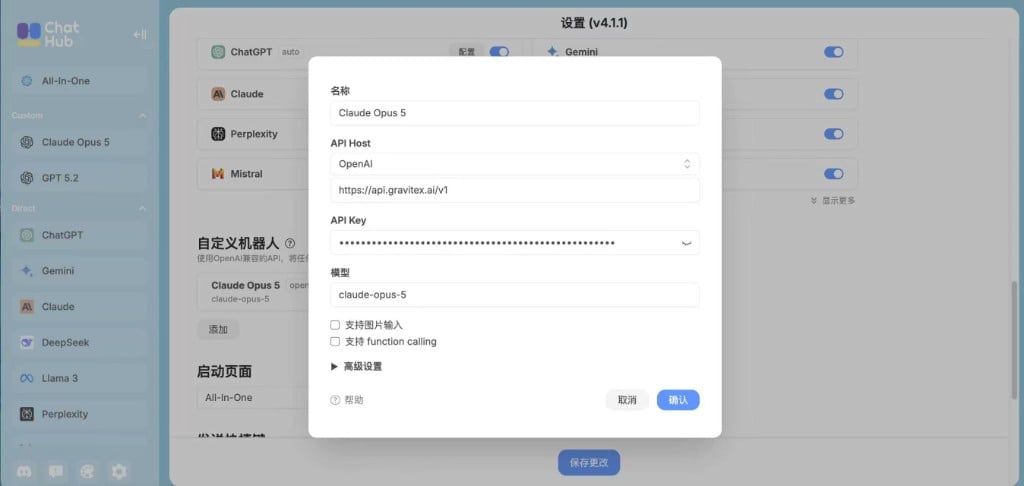 | Field | Value | Notes |
| ------------ | ----------------------------------------------------------------------------------------------- | ------------------------------------------------------------- |
| **Name** | e.g. `Custom` | Any label you like |
| **API Host** | Choose OpenAI in the dropdown, then set `https://api.gravitex.ai/v1` | **Must include `/v1`** |
| **API Key** | e.g. `sk-...` | Paste the GravitexAI key from Step 1 |
| **Model** | Model ID such as `claude-sonnet-5`, `gpt-5.5`, `deepseek-v4-pro`, `kimi-k3`, `gemini-3.6-flash` | Use a valid [model ID](https://maas.gravitex.ai/#/api-models) |
Optional advanced options:
1. **Support image input**:
* When checked, ChatHub shows an upload button so you can paste/upload images to this model
* When unchecked, the upload UI is hidden even if the model supports vision
2. **Support function calling**: check when the model supports tool calling
3. **Advanced settings**: collapsed by default; expand as needed
**Configuration tips**
* API Host must include the `/v1` suffix
* Image input only unlocks the client upload UI; if the backend model does not support images, sending images will still fail
* No browser restart required — changes apply immediately
### Step 4: Select the model
After saving, return to the ChatHub main UI. Your custom models appear in the dropdown and are ready to use.
## 5. Three usage modes
| Mode | How to trigger | Best for |
| ----------------------- | -------------------------------------------------------- | ------------------------------------------- |
| **Single-model chat** | Chat with one model like ChatGPT | Daily Q\&A, single-model strengths |
| **Multi-model compare** | Check 2–6 models on the right of the input and send once | Model selection, finding the best answer |
| **Web assistant** | Select page text to open the ChatHub toolbar | Translate / summarize papers, polish emails |
**Compare-mode tips**
* Each model’s reply is **independent**; the left main pane shows the default model
* Export all answers via **Export** (top right): Markdown / JSON / PNG
* Prefer **style-diverse** mixes such as GPT-5.5 + Claude Opus 4.7 + DeepSeek V4
## 6. Advanced: strongest multi-vendor compare
ChatHub’s killer feature is running multiple vendors at once. One GravitexAI setup lets you mix any vendor models in compare mode.
### Recommended combinations
| Task | Suggested mix | Why |
| ------------------------------ | ------------------------------------------------ | -------------------------------------- |
| **Coding / bugfix** | GPT-5.5 + Claude Opus 4.7 + DeepSeek V4 | Strong coding + cost-effective option |
| **Long-form / creative** | Claude Sonnet 4.5 + Qwen3.7-Max + GPT-5.5 | Chinese expression + Western narrative |
| **Translation / multilingual** | GPT-5.5 + Gemini 3 Flash + DeepSeek V4 | Cross-check across three vendors |
| **Reasoning / math** | GPT-5.5 (xhigh) + Claude Opus 4.7 + Gemini 3 Pro | Top-tier reasoning trio |
## 7. Supported models
Via GravitexAI, ChatHub supports 100+ mainstream models including OpenAI, Google Gemini, Claude, DeepSeek, and Chinese models.
Latest model recommendations, performance comparisons, and scenario guides — covering text, coding, low-latency, image, and video.
**Why not list models here?**
Models change quickly. We keep the latest list, benchmarks, and usage tips on the [model recommendations page](https://maas.gravitex.ai/#/api-models).
## 8. Troubleshooting
1. Confirm the API key starts with `sk-` and has no extra spaces
2. Check API Base URL: `https://api.gravitex.ai/v1`
3. In the [GravitexAI Console](https://maas.gravitex.ai/#/api-keys), verify the key is enabled and balance is sufficient
4. Insufficient balance can also return 401 — check account balance
* Wait for the model list to refresh
* Click **Refresh models** manually
* Check API key permissions
* Confirm multiple models are checked on the right of the input
* Ensure all models are from the same provider (or different providers that are each configured)
* Switch to a faster model
* Check network latency
* Reduce context length
## 9. Best practices
### Performance
1. **Choose models wisely**
* Match model complexity to the task
* See [model recommendations](https://maas.gravitex.ai/#/api-models) for current guidance
2. **Compare strategy**
* Comparing near-identical models (e.g. two GPTs) is low value
* Pick models with **different strengths**: coding, writing, reasoning, translation
* Avoid comparing more than 4 models at once — token cost scales quickly
3. **Resource management**
* Monitor API usage
* Set spending / quota alerts
* Keep the extension updated
### Security
* Do not share API keys
* Rotate keys regularly
* Protect the browser with a strong password
* Handle sensitive content carefully
### Team collaboration
ChatHub is mainly for individuals, but teams can:
* Share prompt templates
* Export and share chat history
* Standardize API configuration
## 10. Why ChatHub
### vs other clients
| Feature | ChatHub | Single-model client | Other extensions |
| ---------------------------- | ---------------- | ------------------- | ---------------- |
| **Side-by-side multi-model** | ✅ Core | ❌ | Rare |
| **Browser sidebar** | ✅ | ❌ | Some |
| **Web assistant** | ✅ | ❌ | Some |
| **Custom API** | ✅ | ✅ | ✅ |
| **Cross-device sync** | ✅ (browser sync) | ❌ | Varies |
| **Local chat history** | ✅ | Varies | Varies |
### Reasons to choose ChatHub
1. **Model selection**: running many models at once is hard to replace
2. **Mixed vendors**: OpenAI / Claude / Gemini / Chinese models in any combo
3. **In-page workflow**: as an extension, it works on any webpage
4. **Privacy-first**: chats stored locally; the extension does not harvest your data
5. **Actively maintained**: ongoing updates
**More help**: contact [bd@gravitex.ai](mailto:bd@gravitex.ai) or call 13603055233.
| Field | Value | Notes |
| ------------ | ----------------------------------------------------------------------------------------------- | ------------------------------------------------------------- |
| **Name** | e.g. `Custom` | Any label you like |
| **API Host** | Choose OpenAI in the dropdown, then set `https://api.gravitex.ai/v1` | **Must include `/v1`** |
| **API Key** | e.g. `sk-...` | Paste the GravitexAI key from Step 1 |
| **Model** | Model ID such as `claude-sonnet-5`, `gpt-5.5`, `deepseek-v4-pro`, `kimi-k3`, `gemini-3.6-flash` | Use a valid [model ID](https://maas.gravitex.ai/#/api-models) |
Optional advanced options:
1. **Support image input**:
* When checked, ChatHub shows an upload button so you can paste/upload images to this model
* When unchecked, the upload UI is hidden even if the model supports vision
2. **Support function calling**: check when the model supports tool calling
3. **Advanced settings**: collapsed by default; expand as needed
**Configuration tips**
* API Host must include the `/v1` suffix
* Image input only unlocks the client upload UI; if the backend model does not support images, sending images will still fail
* No browser restart required — changes apply immediately
### Step 4: Select the model
After saving, return to the ChatHub main UI. Your custom models appear in the dropdown and are ready to use.
## 5. Three usage modes
| Mode | How to trigger | Best for |
| ----------------------- | -------------------------------------------------------- | ------------------------------------------- |
| **Single-model chat** | Chat with one model like ChatGPT | Daily Q\&A, single-model strengths |
| **Multi-model compare** | Check 2–6 models on the right of the input and send once | Model selection, finding the best answer |
| **Web assistant** | Select page text to open the ChatHub toolbar | Translate / summarize papers, polish emails |
**Compare-mode tips**
* Each model’s reply is **independent**; the left main pane shows the default model
* Export all answers via **Export** (top right): Markdown / JSON / PNG
* Prefer **style-diverse** mixes such as GPT-5.5 + Claude Opus 4.7 + DeepSeek V4
## 6. Advanced: strongest multi-vendor compare
ChatHub’s killer feature is running multiple vendors at once. One GravitexAI setup lets you mix any vendor models in compare mode.
### Recommended combinations
| Task | Suggested mix | Why |
| ------------------------------ | ------------------------------------------------ | -------------------------------------- |
| **Coding / bugfix** | GPT-5.5 + Claude Opus 4.7 + DeepSeek V4 | Strong coding + cost-effective option |
| **Long-form / creative** | Claude Sonnet 4.5 + Qwen3.7-Max + GPT-5.5 | Chinese expression + Western narrative |
| **Translation / multilingual** | GPT-5.5 + Gemini 3 Flash + DeepSeek V4 | Cross-check across three vendors |
| **Reasoning / math** | GPT-5.5 (xhigh) + Claude Opus 4.7 + Gemini 3 Pro | Top-tier reasoning trio |
## 7. Supported models
Via GravitexAI, ChatHub supports 100+ mainstream models including OpenAI, Google Gemini, Claude, DeepSeek, and Chinese models.
Latest model recommendations, performance comparisons, and scenario guides — covering text, coding, low-latency, image, and video.
**Why not list models here?**
Models change quickly. We keep the latest list, benchmarks, and usage tips on the [model recommendations page](https://maas.gravitex.ai/#/api-models).
## 8. Troubleshooting
1. Confirm the API key starts with `sk-` and has no extra spaces
2. Check API Base URL: `https://api.gravitex.ai/v1`
3. In the [GravitexAI Console](https://maas.gravitex.ai/#/api-keys), verify the key is enabled and balance is sufficient
4. Insufficient balance can also return 401 — check account balance
* Wait for the model list to refresh
* Click **Refresh models** manually
* Check API key permissions
* Confirm multiple models are checked on the right of the input
* Ensure all models are from the same provider (or different providers that are each configured)
* Switch to a faster model
* Check network latency
* Reduce context length
## 9. Best practices
### Performance
1. **Choose models wisely**
* Match model complexity to the task
* See [model recommendations](https://maas.gravitex.ai/#/api-models) for current guidance
2. **Compare strategy**
* Comparing near-identical models (e.g. two GPTs) is low value
* Pick models with **different strengths**: coding, writing, reasoning, translation
* Avoid comparing more than 4 models at once — token cost scales quickly
3. **Resource management**
* Monitor API usage
* Set spending / quota alerts
* Keep the extension updated
### Security
* Do not share API keys
* Rotate keys regularly
* Protect the browser with a strong password
* Handle sensitive content carefully
### Team collaboration
ChatHub is mainly for individuals, but teams can:
* Share prompt templates
* Export and share chat history
* Standardize API configuration
## 10. Why ChatHub
### vs other clients
| Feature | ChatHub | Single-model client | Other extensions |
| ---------------------------- | ---------------- | ------------------- | ---------------- |
| **Side-by-side multi-model** | ✅ Core | ❌ | Rare |
| **Browser sidebar** | ✅ | ❌ | Some |
| **Web assistant** | ✅ | ❌ | Some |
| **Custom API** | ✅ | ✅ | ✅ |
| **Cross-device sync** | ✅ (browser sync) | ❌ | Varies |
| **Local chat history** | ✅ | Varies | Varies |
### Reasons to choose ChatHub
1. **Model selection**: running many models at once is hard to replace
2. **Mixed vendors**: OpenAI / Claude / Gemini / Chinese models in any combo
3. **In-page workflow**: as an extension, it works on any webpage
4. **Privacy-first**: chats stored locally; the extension does not harvest your data
5. **Actively maintained**: ongoing updates
**More help**: contact [bd@gravitex.ai](mailto:bd@gravitex.ai) or call 13603055233.