> ## Documentation Index
> Fetch the complete documentation index at: https://docs.gravitex.ai/llms.txt
> Use this file to discover all available pages before exploring further.
# Claude插件(VS Code)
> Claude Code for VS Code 插件安装与配置指南
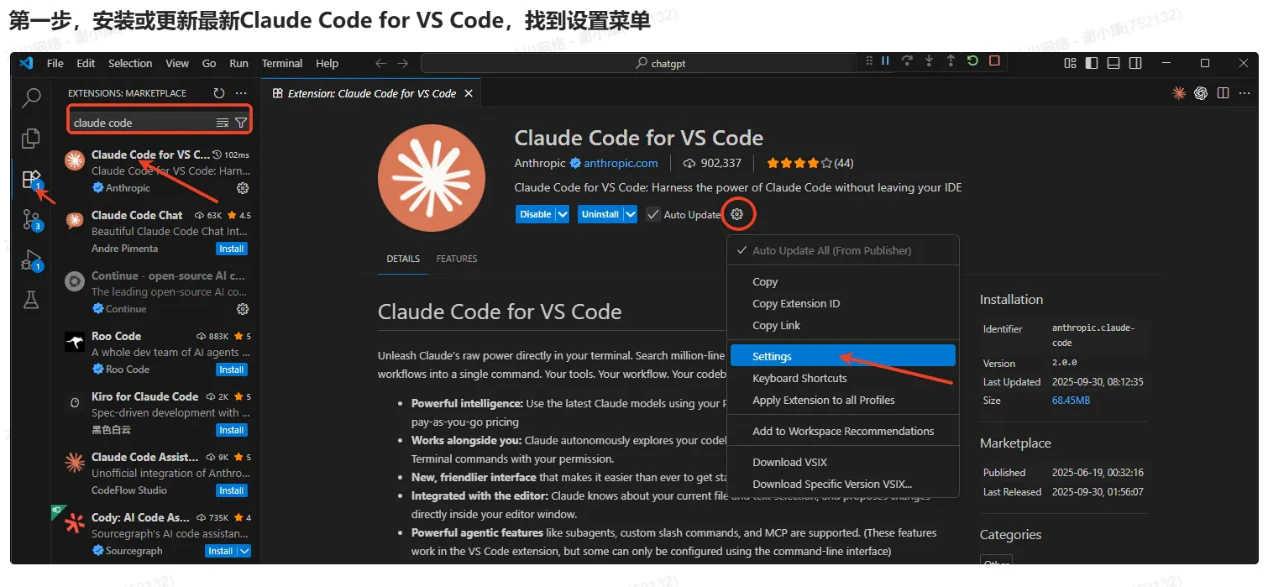
## 第一步:安装或更新 Claude Code 插件
1. 打开 VS Code 编辑器,进入左侧「扩展」面板(快捷键:Ctrl+Shift+X)。
2. 在扩展市场搜索框中输入「Claude Code for VS Code」,找到 Anthropic 官方发布的插件(标识为「anthropic.claude-code」)。
3. 插件核心特性:支持 Claude 最新模型、终端直接调用、代码库自动分析、子代理/自定义斜杠命令等智能功能,部分高级配置需通过命令行补充设置。
 ## 第二步:配置 settings.json 文件
### 2.1 打开配置文件
1. 点击 VS Code 左下角「设置」图标(或使用快捷键 Ctrl+,),在设置页面搜索「@ext:Anthropic.claude-code」筛选插件专属配置。
2. 找到「Claude-code: Environment Variables」选项,点击右侧「Edit in settinnpm i -g mintgs.json」。
## 第二步:配置 settings.json 文件
### 2.1 打开配置文件
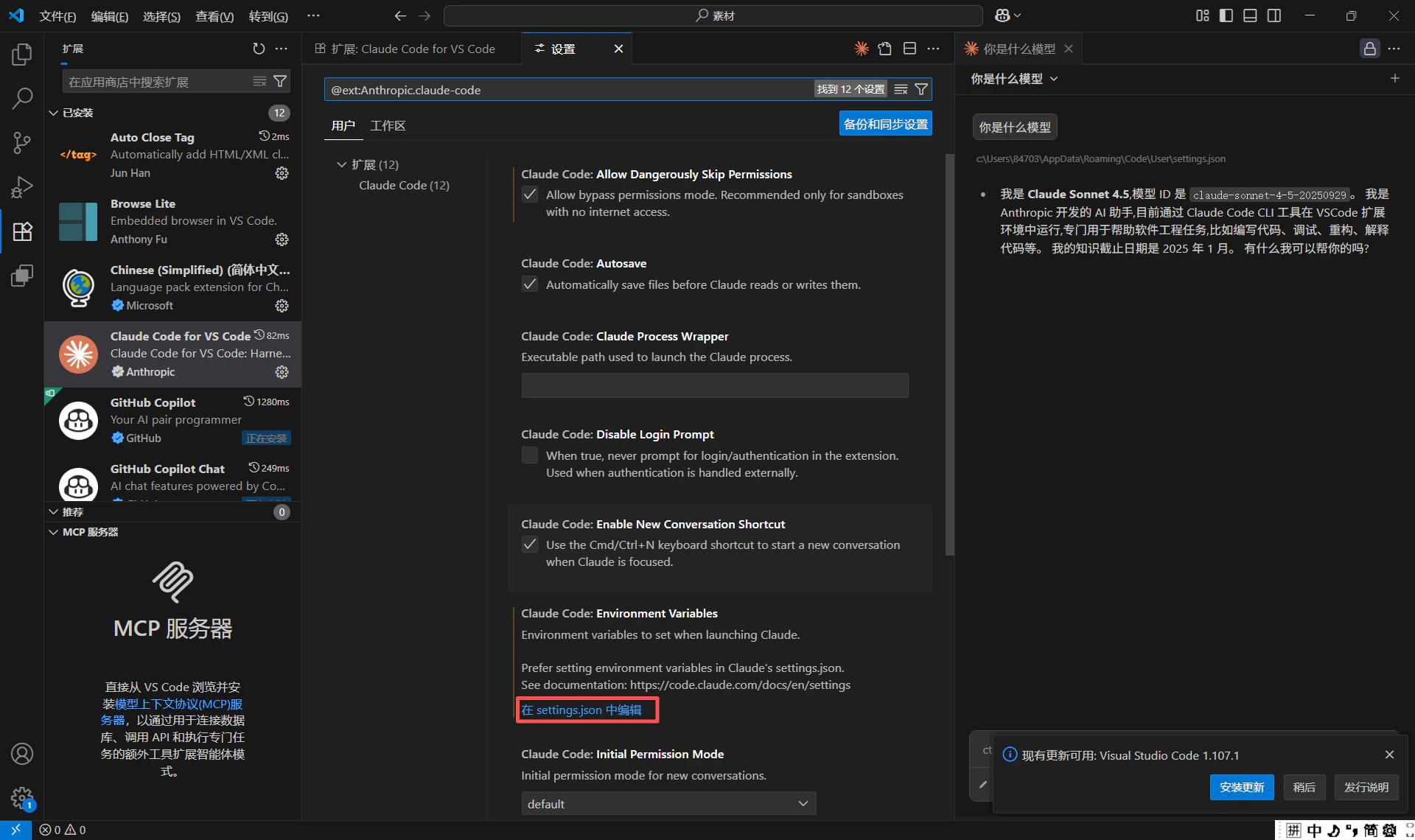
1. 点击 VS Code 左下角「设置」图标(或使用快捷键 Ctrl+,),在设置页面搜索「@ext:Anthropic.claude-code」筛选插件专属配置。
2. 找到「Claude-code: Environment Variables」选项,点击右侧「Edit in settinnpm i -g mintgs.json」。
 ### 2.2 添加核心配置
在 settings.json 中补充以下完整配置(按需修改模型版本和显示位置):
```jsonc theme={null}
{
"claudeCode.preferredLocation": "panel",
"claudeCode.allowDangerouslySkipPermissions": true,
"claudeCode.selectedModel": "claude-sonnet-4-5-20250929",
"claudeCode.environmentVariables": [
{
"name": "ANTHROPIC_BASE_URL",
"value": "https://api.gravitex.ai"
},
{
"name": "ANTHROPIC_AUTH_TOKEN",
"value": "sk-xxxxx" // 替换为你的API密钥
}
]
}
```
### 2.2 添加核心配置
在 settings.json 中补充以下完整配置(按需修改模型版本和显示位置):
```jsonc theme={null}
{
"claudeCode.preferredLocation": "panel",
"claudeCode.allowDangerouslySkipPermissions": true,
"claudeCode.selectedModel": "claude-sonnet-4-5-20250929",
"claudeCode.environmentVariables": [
{
"name": "ANTHROPIC_BASE_URL",
"value": "https://api.gravitex.ai"
},
{
"name": "ANTHROPIC_AUTH_TOKEN",
"value": "sk-xxxxx" // 替换为你的API密钥
}
]
}
```